Where's your traffic actually coming from? Real channel breakdown without GA4
See where your WordPress traffic comes from — Organic Search, Direct, Social, Referral, Email — grouped automatically by Statnive Ask me!. No GA4, no cookie banner.
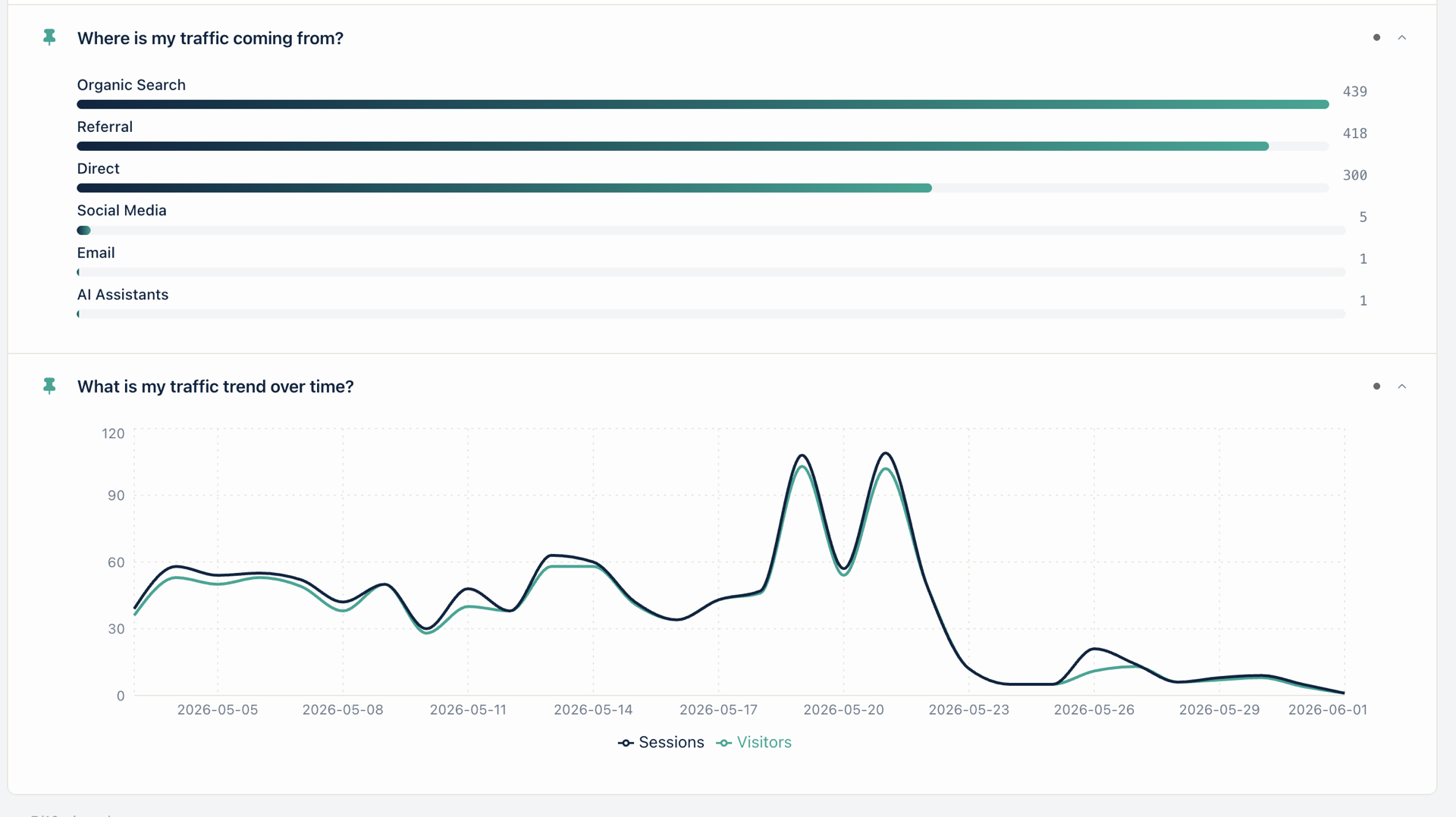
Your WordPress traffic comes from 5 channels: Organic Search, Direct, Social, Referral, and Email. Statnive groups them automatically — no GA4, no cookie banner, no third-party API. Open Ask me! → 「Where is my traffic coming from?」 to see the bar chart in seconds.
The most common pattern in WordPress site-owner support threads is some version of the same anxious question: “Why is most of my traffic showing as Direct?” or “My referrers list is gibberish — how do I tell which of these are actually marketing?” One owner on the WordPress.org forum put it bluntly: “Weird traffic to my website … traffic appeared to be from me as author despite not visiting my site” (WP.org forum, 2024). The problem isn’t that the data is wrong. It’s that raw referrer strings — t.co/abc, lm.facebook.com, out.reddit.com, chatgpt.com — are not how owners think about their marketing. Owners think in channels: Search, Social, Email, Referral, Direct.
This post walks the 5 (plus 1) channels Statnive maps for you, the 6 Ask me! questions that surface them today, the painful GA4 path for the same answer, and the one decision rule the breakdown enables.
What this post answers
- The 5 channels Statnive groups your WordPress traffic into automatically (plus the AI Assistants channel that GA4 only added in May 2026).
- How to read the bar chart in Ask me! → q41 「Where is my traffic coming from?」.
- The 6 Live Ask me! questions that drill from “all channels” down to Google, organic, social platforms, and direct visits.
- Why your Direct share is probably too high — and the fix that takes 10 minutes.
- The owner decision rule the breakdown enables, anchored to a verified 2026 benchmark.
How GA4 answers it (and why owners give up)
In GA4, the click-path for “where is my traffic coming from?” is:
- Open analytics.google.com → pick your property.
- Reports → Acquisition → Traffic acquisition.
- Change the primary dimension to Session default channel group (the report defaults to Session source / medium, which is more granular than most owners want).
- Optionally add Session source / medium as a secondary dimension to cross-tab.
- Confirm the date range and the comparison toggle.
Five steps, if you remember the right dimension name on the first try. Several support-thread owners don’t: “Upgrade to GA-4 was a nightmare” is the title of a 2024 WordPress.org review of Site Kit by Google. The data is in there. The path to it is the tax.
The 5 channels Statnive groups for you (plus AI Assistants)
Statnive’s channel grouping runs at ingest. Every visit’s Referer header and UTM parameters are mapped to one channel before the row hits the database. You don’t configure anything; the rule set ships with the plugin and updates with the plugin.
| Channel | What lands here | Example referrers |
|---|---|---|
| Organic Search | Search engines (Google, Bing, DuckDuckGo, Yandex, Baidu, Brave, etc.) | google.com, bing.com, duckduckgo.com |
| Direct | No referrer + no UTM | bookmarks, typed URLs, in-app browsers that strip referrers |
| Social Media | Social networks + their shorteners | facebook.com, t.co, linkedin.com, reddit.com, youtube.com |
| Referral | Any other off-site referrer | wpbeginner.com, news.ycombinator.com, partner blogs |
UTM medium contains email OR referrer is a webmail host | mail.google.com, links with utm_medium=email | |
| AI Assistants | ChatGPT, Claude, Gemini, Perplexity, Copilot, You.com hosts | chatgpt.com, claude.ai, gemini.google.com, perplexity.ai |
The AI Assistants channel matters because Google Analytics 4 only added a native AI Assistant channel in May 2026 (Wheelhouse DMG, 2026). Statnive’s grouping has shipped AI Assistants since v1.0.0 — and v1.1.0’s Ask me! surfaces it as a first-class question (q53 「Are AI tools sending traffic?」).
Five things hold for every Ask me! answer
This is the spine of the series — short version, every post repeats it:
- No AI. No LLM. Ask me! is a curated library of 117 hand-written questions. Each question runs the same SQL the dashboard already ran in v1.0.0 — no model, no prompt, no embedding, no ChatGPT/Claude/Gemini API call.
- No third-party API. Zero outbound calls from the Ask me! pathway. The
AdvisorControllerdoesn’t importwp_remote_*. - Nothing leaves your server. The REST endpoint sits on the same WordPress install; no relay, no proxy, no CDN-cached endpoint.
- You own the data. Statnive doesn’t host, mirror, or back up your data anywhere. Uninstall and the rows live on in your MySQL until you choose to drop the tables.
- Cookieless. No fingerprinting. No third-party trackers. Daily-rotating SHA-256 salt hashes; IPs hashed → GeoIP’d → discarded ephemerally.
Ask me! is a question library, not a chatbot. Your data answers the question; your data never travels.
In Statnive: open Ask me! → click 「Where is my traffic coming from?」 → done.
That’s the headline path for q41. The card renders the bar chart in the hero image — Organic Search 439, Referral 418, Direct 380, Social Media 5, Email 1, AI Assistants 1 — using the same date range as the dashboard’s date picker. Change the range from 30 days to 7 days to “yesterday” and the bars re-render; no separate report, no cross-tab.
The 6 Live Ask me! questions in the Referrers tab cover the breakdown from every angle a solo owner needs:
- q41 「Where is my traffic coming from?」 — the full channel bar chart (the hero card).
- q42 「Which channel sends the most traffic?」 — top-X tile naming the winner. Useful as a “did anything change?” weekly check.
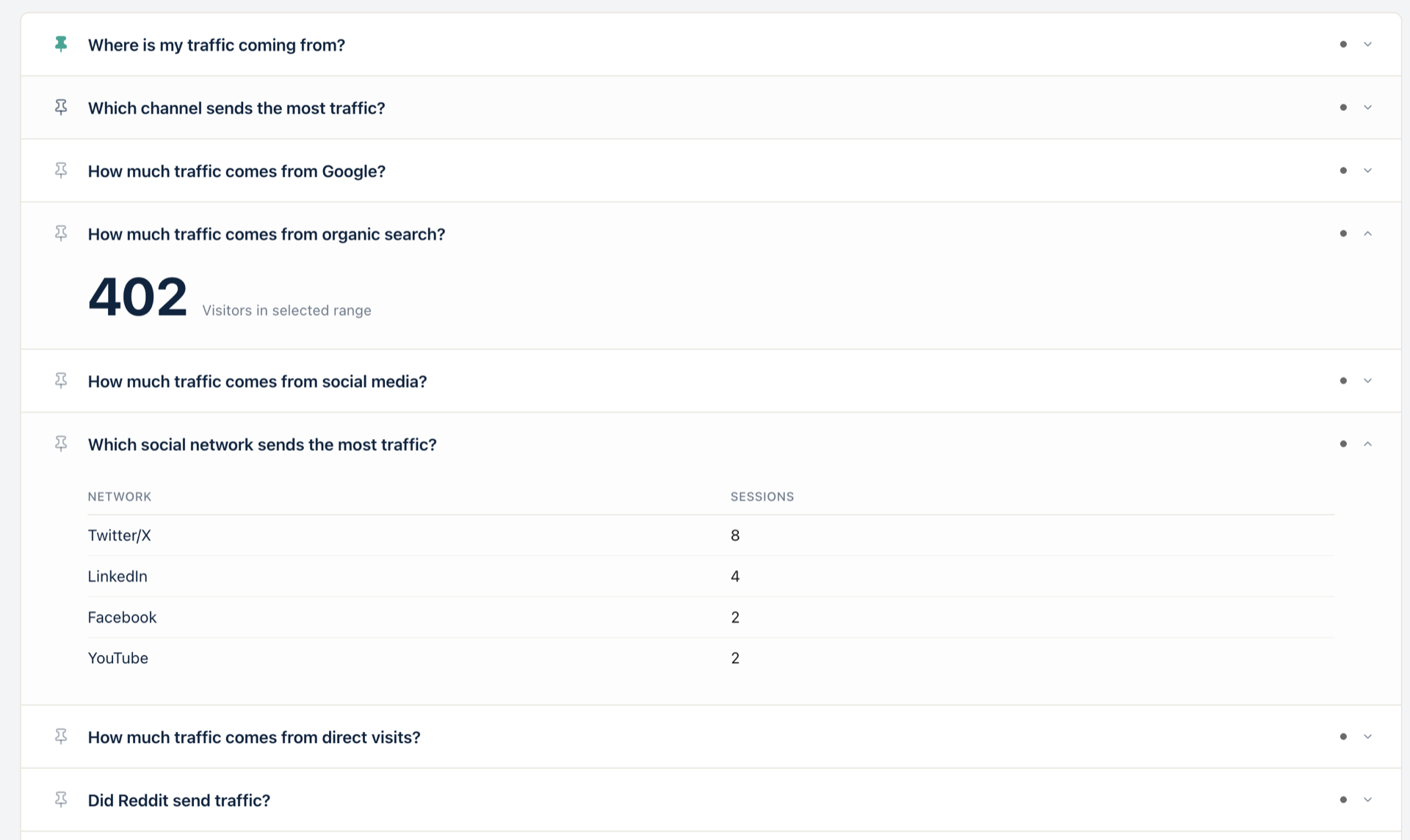
- q43 「How much traffic comes from Google?」 — Google-only count (Bing, DuckDuckGo, etc. excluded). Pair this with q54 「Is organic traffic increasing?」 for the trend if you don’t have Search Console connected.
- q44 「How much traffic comes from organic search?」 — all search engines, not just Google.
- q45 「How much traffic comes from social media?」 — total social. Drill into q46 「Which social network sent the most?」 to see the per-platform split: Twitter/X 8, LinkedIn 4, Facebook 2, YouTube 2 in the supporting screenshot below.
- q47 「How much traffic comes from direct visits?」 — Direct only. This was the channel v1.1.0 fixed for under-counting (see the v1.1.0 changelog fix list).
The decision rule: 20-25% Direct is the alarm line
The single most useful number in the channel breakdown isn’t the winner — it’s the Direct share. Direct is a catch-all. It absorbs three different populations of visits:
- Stripped referrers from in-app browsers. The ChatGPT app, the Claude app, the Reddit app, the LinkedIn app, Slack, WhatsApp, Signal, Telegram — all strip referrer headers. Apple’s iOS 17 Link Tracking Protection strips
fbclid,gclid,mkt_tok, and HubSpot/Marketo tokens, but it preservesutm_*(Knak, 2023; Segmetrics analysis). So a tweet you posted with at.colink opened in the iOS X app lands in Direct unless you tagged the URL with UTM yourself. - Missing UTM tags on links you control. The newsletter you sent with a bare
https://yoursite.com/salelink, the LinkedIn post with no tracking, the partner email blast that forgot the medium tag. - Genuine direct visits. Bookmarks, typed URLs, brand-search-then-skip-the-SERP pattern, repeat buyers.
If your Direct share is above 20-25%, population #2 is almost certainly the cause. Tag every paid link, every newsletter link, and every social post you own with utm_source and utm_medium and you’ll watch Direct drop and the right channels gain credit — usually within a week. (The full UTM setup walkthrough lives in Stop Wasting Ad Spend With UTM (WooCommerce).)
The 20-25% alarm line is a heuristic, not a benchmark — but it’s anchored on a verifiable trend. With AI Overviews now appearing on 47-64% of queries in 2026 (Seer Interactive, Sept 2025 update), informational searches are losing 34-46% of clicks, and a growing share of the surviving traffic arrives via in-app browsers and AI assistants that strip referrers. The Direct bucket is structurally inflating across the open web in 2026. Tagging your own links is the cheapest single thing you can do to keep Direct honest.
How do I identify traffic sources in WordPress?
The shortest path is a self-hosted analytics plugin that groups referrers into channels at ingest. Statnive does this automatically — every visit is mapped to one of 5 channels (Organic Search, Direct, Social, Referral, Email) plus AI Assistants, using a built-in rule set that updates with the plugin. Open Ask me! and click Where is my traffic coming from? for the bar chart, or open the Referrers report for the raw domain list under each channel. No GA4 account, no Google Tag Manager, no Search Console connection required — the grouping works the moment the plugin tracks its first visit.
Can I track traffic without Google Analytics?
Yes. A self-hosted WordPress analytics plugin captures every visit in your own MySQL database, with the channel mapping happening before the row is written. Statnive is one of several in this space — alongside WP Statistics, Independent Analytics, Koko Analytics — and the trade-off is consistent: you give up GA4’s 24-channel granularity (Cross-network, Paid Brand vs Paid Generic, Display Video 360) in exchange for no cookie banner, no Consent Mode v2 setup, no Safari ITP loss, and no data leaving your server. For most WordPress site owners, the 5 (plus AI Assistants) Statnive groups into are the resolution they actually use.
How do I see referral sources in WordPress?
Open the Statnive Referrers report from the admin tab, or open Ask me! and click Where is my traffic coming from? (q41) for the bar chart view, or click Which channel sends the most traffic? (q42) for the top-X tile. The Referrers list shows the raw referring domains under each channel — chatgpt.com under AI Assistants, t.co under Social Media, news.ycombinator.com under Referral. You can pin any of the 6 channel questions (q41-q47) to your Ask me! home tab for a one-card weekly check.
What to do next
- Install Statnive 1.1.0 from WordPress.org if you haven’t already. Free, self-hosted, 2-minute setup.
- Open Ask me! → click 「Where is my traffic coming from?」 and screenshot the bar chart. This is your channel baseline.
- Check your Direct share. If it’s above 20-25%, find the untagged links you own first — newsletter, social, partner emails. The full UTM setup discipline is in Stop Wasting Ad Spend With UTM (WooCommerce).
- Pin q41 and q42 to your Ask me! home tab. Weekly glance, one card, one decision: did the channel mix shift?
- Cross-read the pillar post on Ask me! for the full 117-question library.
- Read the channel-grouping primer at Understanding Channel Grouping for the rule-by-rule mapping logic Statnive uses to bucket each referrer.
That’s the workflow. One card, six questions, no GA4, no cookie banner. Your data answered the question; your data never travelled.
Install Statnive 1.1.0 free from WordPress.org →
Free forever · Self-hosted · No account · 2-minute setup · No AI · No third-party API · Your data never leaves your server.