Understanding Channel Grouping in Statnive
How Statnive automatically classifies your traffic into 8 readable channels.
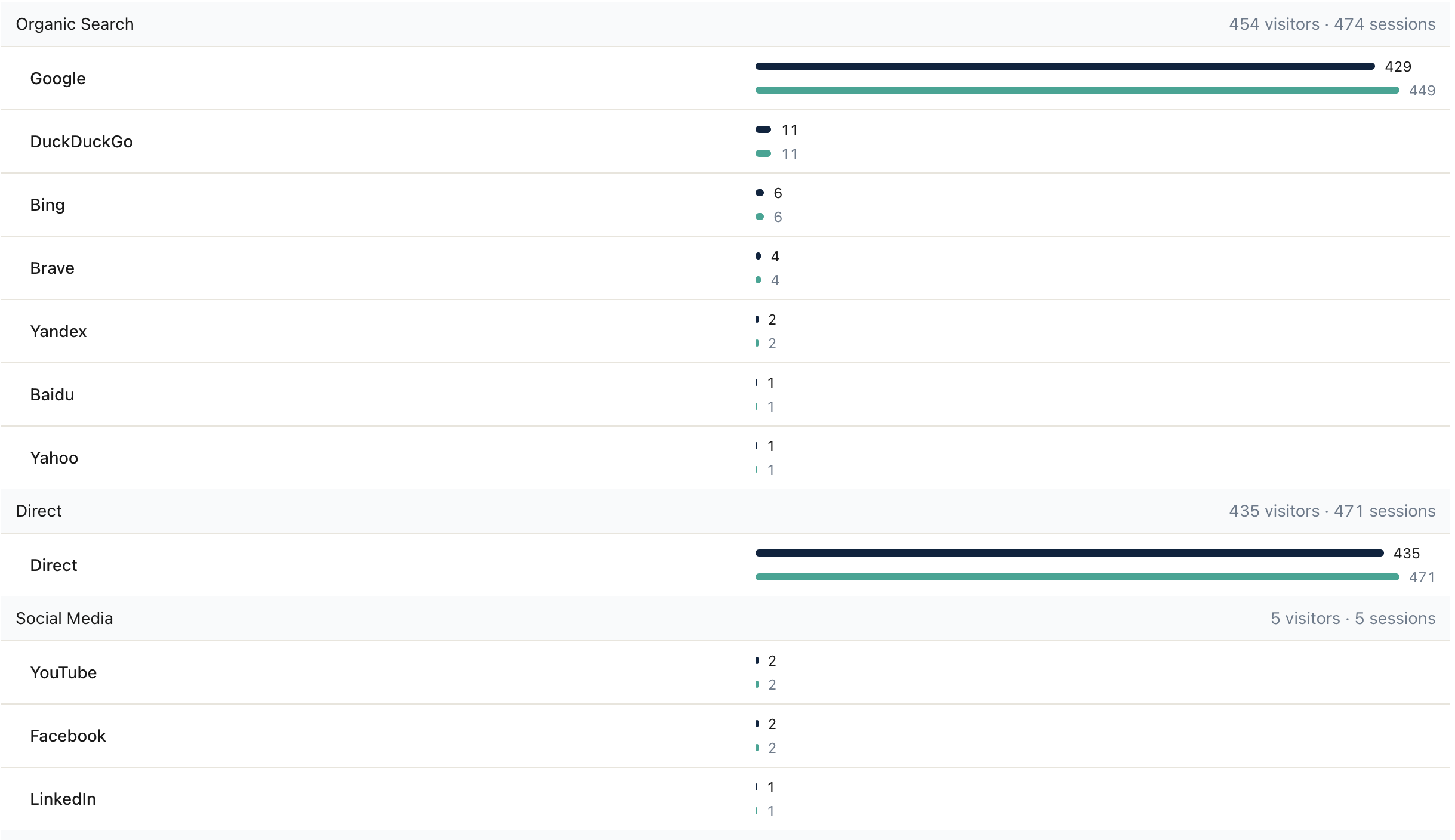
What Is Channel Grouping?
Raw referrer data is messy. A visit from www.google.com, google.co.uk, or www.google.com.br all mean the same thing: someone found you through Google search. A hit from t.co is actually Twitter/X. A referrer of l.facebook.com is a Facebook link redirect. Channel grouping takes these raw strings and maps them to eight human-readable categories so you can make decisions at a glance.
The Eight Channels
Statnive classifies every visit into one of these channels:
- Direct — Visitors who typed your URL directly, used a bookmark, or arrived through a link with no referrer information. Also includes some mobile app traffic where the referrer is stripped.
- AI Assistants — Traffic from ChatGPT, Claude, Gemini, Perplexity, Copilot, NotebookLM, Meta AI, and other LLM-based assistants. Checked before search engines so
gemini.google.comclassifies as AI rather than as a Google search subdomain. - Organic Search — Visitors arriving from Google, Bing, DuckDuckGo, Yandex, Baidu, and other search engines. This is typically your largest and most valuable channel for content-driven sites.
- Social Media — Traffic from Facebook, Instagram, Twitter/X, LinkedIn, Pinterest, Reddit, TikTok, and dozens of other social platforms. Includes mobile app referrers and link-shortener redirects.
- Email — Clicks from email campaigns. Statnive detects common email client referrers and UTM-tagged email links.
- Referral — Links from other websites that don’t fall into the above categories. Blog mentions, forum posts, partner sites, and directory listings.
- Paid Search — Clicks from Google Ads, Bing Ads, and other paid search campaigns, detected via UTM parameters (
utm_medium=cpc,ppc,paidsearch). - Paid Social — Paid social-media campaigns, detected via UTM parameters (
utm_medium=cpm,paid_social).
How Auto-Classification Works
When a pageview arrives, Statnive checks the referrer header against an internal mapping table of around 100 known domains and patterns covering AI assistants, search engines, social platforms, and email clients. If the referrer matches a known search engine, it goes to Organic Search. If it matches a social platform, it goes to Social Media. UTM parameters (utm_medium=cpc, utm_medium=email) override referrer-based classification when present, giving you precise control over campaign attribution.
Why This Matters for Decisions
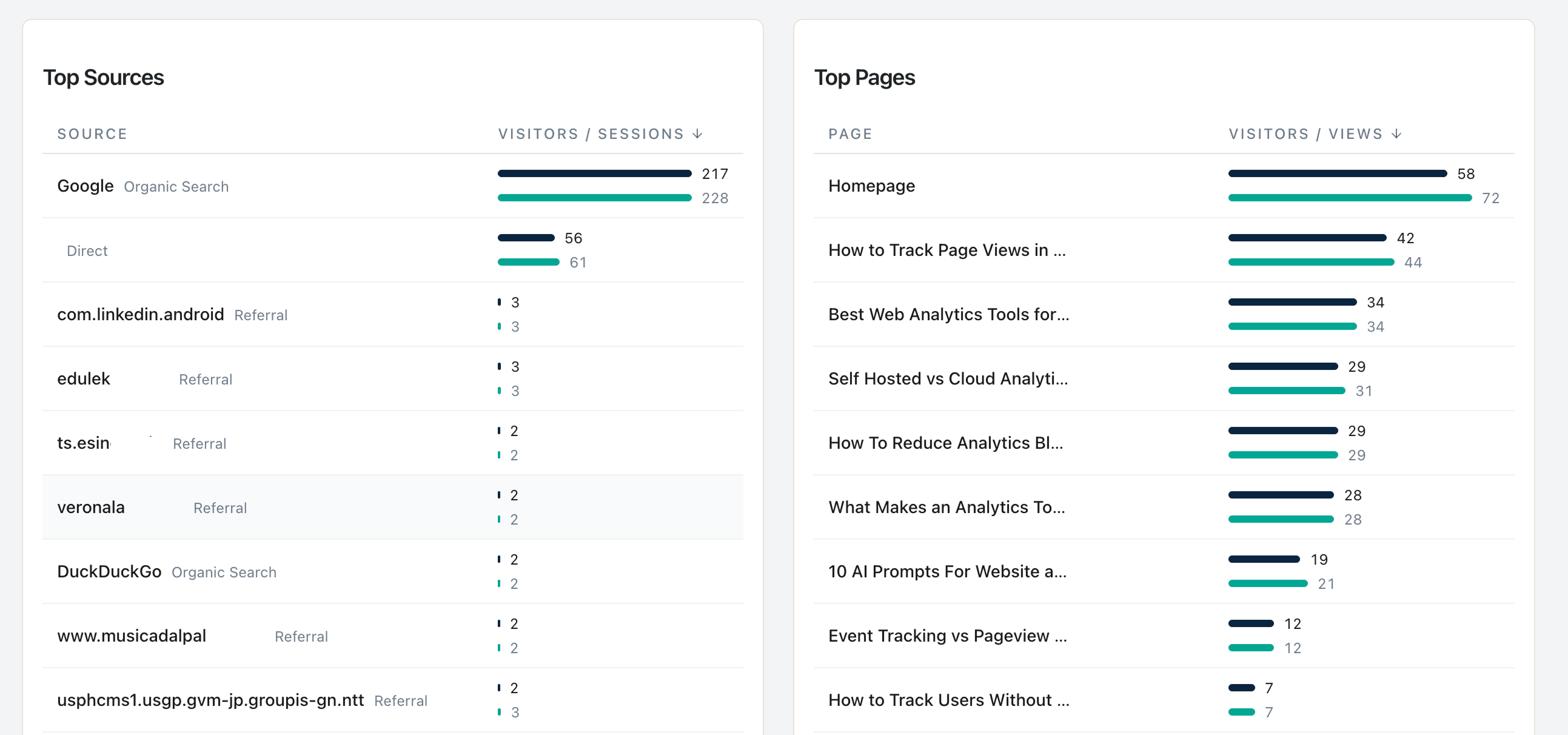
Channel grouping transforms your analytics from a list of cryptic URLs into an actionable breakdown. Instead of scrolling through hundreds of referrer strings, you see immediately that 45% of your traffic comes from Organic Search, 20% from Social Media, and 15% from Direct. In a future release, this will pair with WooCommerce revenue data so you can calculate Revenue Per Visitor for each channel. Even without revenue data, channel grouping immediately shows you which sources drive the most visitors and engagement.
This is one of the features that sets Statnive apart from tools like Jetpack Stats (which has no channel grouping) and WP Statistics (which offers only basic referrer classification). See the full feature list or get started in 2 minutes.