Statnive Is Live on WordPress.org: Privacy-First Analytics
Statnive is now free on WordPress.org. Privacy-first WordPress analytics with a 2.4 KB tracker, GDPR-compliant by design. Install in two minutes.
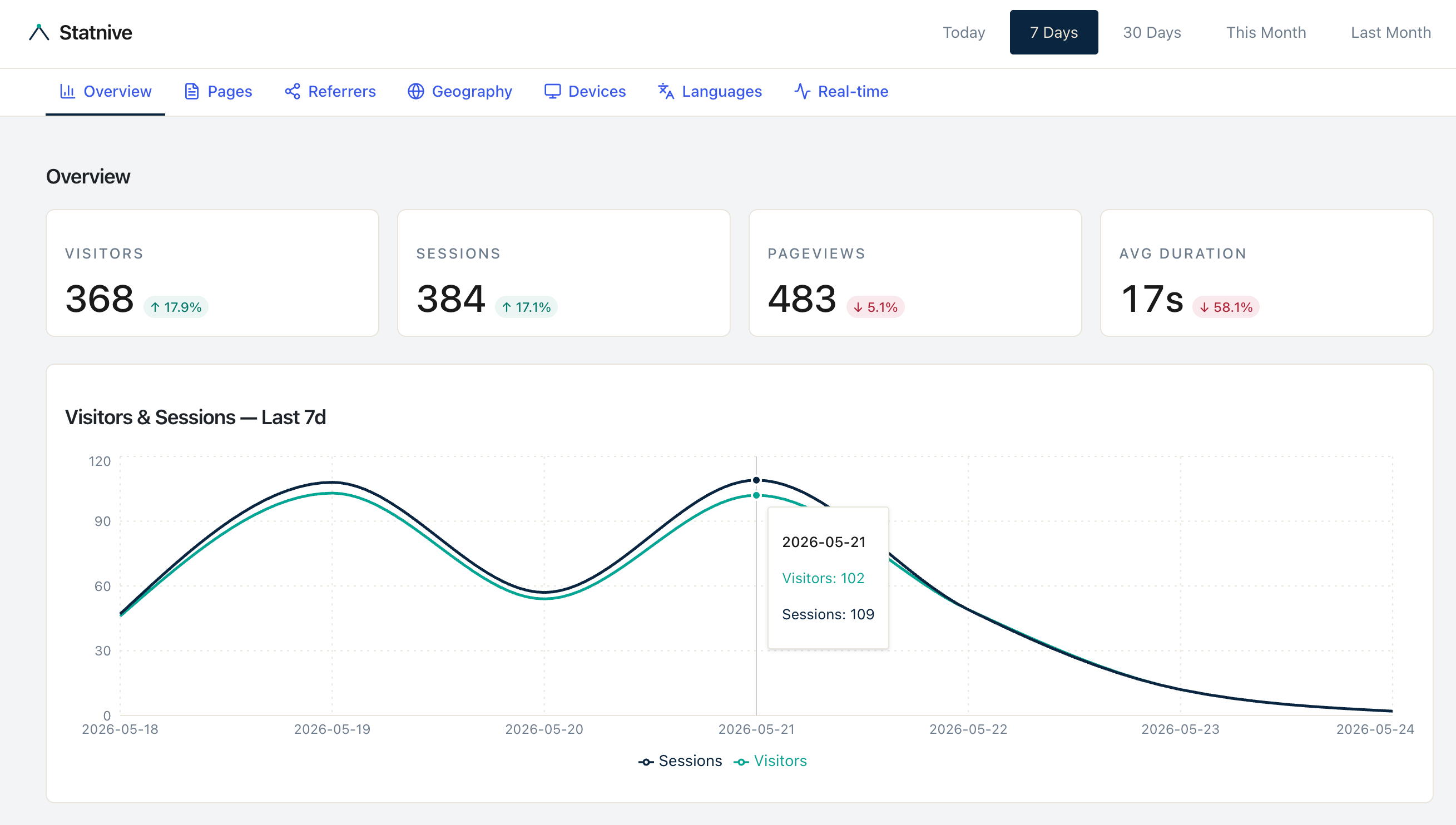
Today Statnive becomes a one-click install for every WordPress site. The plugin is live in the official WordPress.org directory at wordpress.org/plugins/statnive, free forever on the entry tier — no account, no card, no signup form.
WordPress runs roughly 43% of the web. Most of those sites use analytics tools designed for someone else: enterprise marketing teams, advertising networks, or data engineers who think in pivot tables. Statnive is built for the site owner who wants to know where visitors come from, what they do, and which channels are working — without sending a single byte of visitor data to a third party.
Install Statnive free from WordPress.org →
Free forever · Self-hosted · No account required · 2-minute setup
What ships in v0.4.13
The version live on WordPress.org today is 0.4.13, tested up to WordPress 6.9, requires WordPress 6.2 with PHP 8.1+, and is licensed GPL-2.0-or-later. Every feature below is in the plugin you can download right now:
- Real-time visitor counter — see who’s on your site in the last 5 minutes, refreshing without polling cookies.
- Smart channel grouping — referrer strings auto-classified into Direct, Organic Search, Social Media, Email, Referral, Paid Search, Paid Social, and a dedicated AI Assistants channel for ChatGPT, Claude, Gemini, Perplexity, Copilot, NotebookLM, Meta AI, Le Chat, Deepseek, You, iAsk, Jasper, and Writesonic.
- Geographic insight — country, region, and city via a layered fallback (timezone hint, CDN headers, DB-IP Lite, MaxMind GeoLite2).
- Device, browser, OS detection — using Matomo’s well-maintained
device-detectorlibrary, isolated into theStatnive\Dependencies\namespace via Mozart so it can’t conflict with another plugin’s copy. - Self-hosted everything — 21 normalized database tables on your own MySQL/MariaDB, every query prepared via
$wpdb->prepare(). - WP-CLI integration — pull stats, manage exclusions, and reset state from the terminal.
- Translation-ready — POT file shipped with the plugin, ready for the WordPress.org translation contributor flow.
The tracker JavaScript that runs in every visitor’s browser is 2,406 bytes gzipped. That’s smaller than most favicons.
The six principles we shipped behind
Statnive isn’t a feature list. It’s a stance on how analytics should work on the open web. These are the operating principles we benchmarked every line of code against:
1. Reject vanity metrics
Bounce rate, time-on-site, pages-per-session — none of them appear in the primary dashboard. They flatter your traffic without telling you anything you can act on. The dashboard shows visitor counts by source, by page, by channel, and by geography. That’s what site owners actually use.
2. Real-time is the default
Open the dashboard, and the default view is Today — not “Last 30 Days.” A live counter ticks in the corner. The feedback loop between publishing a post and seeing readers arrive is short enough to be addictive, which is the whole point of having analytics at all.
3. Channel grouping out of the box
Most analytics tools dump raw referrers into your face: t.co/abc123, lm.facebook.com, news.ycombinator.com. Statnive maps every referrer to a human-readable channel at ingest. You don’t configure it. You don’t write regexes. AI assistants get their own channel because that’s where a growing slice of organic traffic now comes from — and it’s the kind of insight you’d miss if you bucketed Claude under “Direct” and ChatGPT under “Referral”.
4. Self-hosted is the compliance advantage
Every byte of visitor data stays on your server. There is no third-party transfer. No data-processing agreement with us. No EU–US adequacy question to resolve. No structural reason to put up a consent banner for analytics that never leave your jurisdiction — which is the whole point of running a self-hosted analytics tool.
5. Privacy by design, not by configuration
The tracker uses no cookies, no localStorage, no sessionStorage, and no browser fingerprinting. Visitor identity is derived from a SHA-256 hash of the IP + user agent + a daily-rotating salt generated by a cryptographic random source. The same visitor visiting the same site on two consecutive days produces two different hashes — there is no persistent identifier to leak, subpoena, or sell. The tracker respects navigator.doNotTrack and navigator.globalPrivacyControl automatically.
6. Built for WordPress, not adapted for it
Statnive registers a WordPress Privacy API exporter and eraser on activation, so the data-subject rights flows already built into WordPress 4.9.6+ work out of the box. The dashboard mounts inside wp-admin, not on a separate domain. Tracker payloads are HMAC-SHA256 signed and validated with constant-time hash_equals() comparison. Admin endpoints are guarded by current_user_can('manage_options'). Tracker endpoints are rate-limited at 60 requests per minute per IP.
Read the engineering story behind the tracker →
A two-minute install
- In
wp-admin, navigate to Plugins → Add New. - Search for Statnive.
- Click Install Now, then Activate.
That’s it. No verification code to paste into your theme. No wp-config.php constant to define. No external account to create. The plugin registers its REST routes, sets up its GeoIP fallback chain, and starts collecting page views the moment you click Activate.
If you prefer the terminal:
wp plugin install statnive --activatePricing: free is the product
The free tier on WordPress.org covers what most WordPress site owners need to run a serious site. Paid tiers are on the public 2026 roadmap and will layer on top of the same plugin — no separate “pro” download, no migration.
| Tier | Status | Highlights |
|---|---|---|
| Free | Live today | Full dashboard, real-time, channel grouping, geo data, WooCommerce Revenue Report (v1.0.0+), 30-day retention |
| Growth | Roadmap 2026 | Anomaly alerts, Slack/Telegram revenue alerts, ad-spend MER, weekly AI executive summary, Meta CAPI server-side |
| Agency | Roadmap 2026 | Heatmaps, white-label, AI insights, SLA support |
The free tier isn’t a trial. It isn’t gated by site count, pageview count, or visitor count. It’s the same plugin our future paying customers will use, with the premium features compile-time-disabled. See the full tier breakdown on the pricing page.
What’s shipped, what’s roadmap (the honest list)
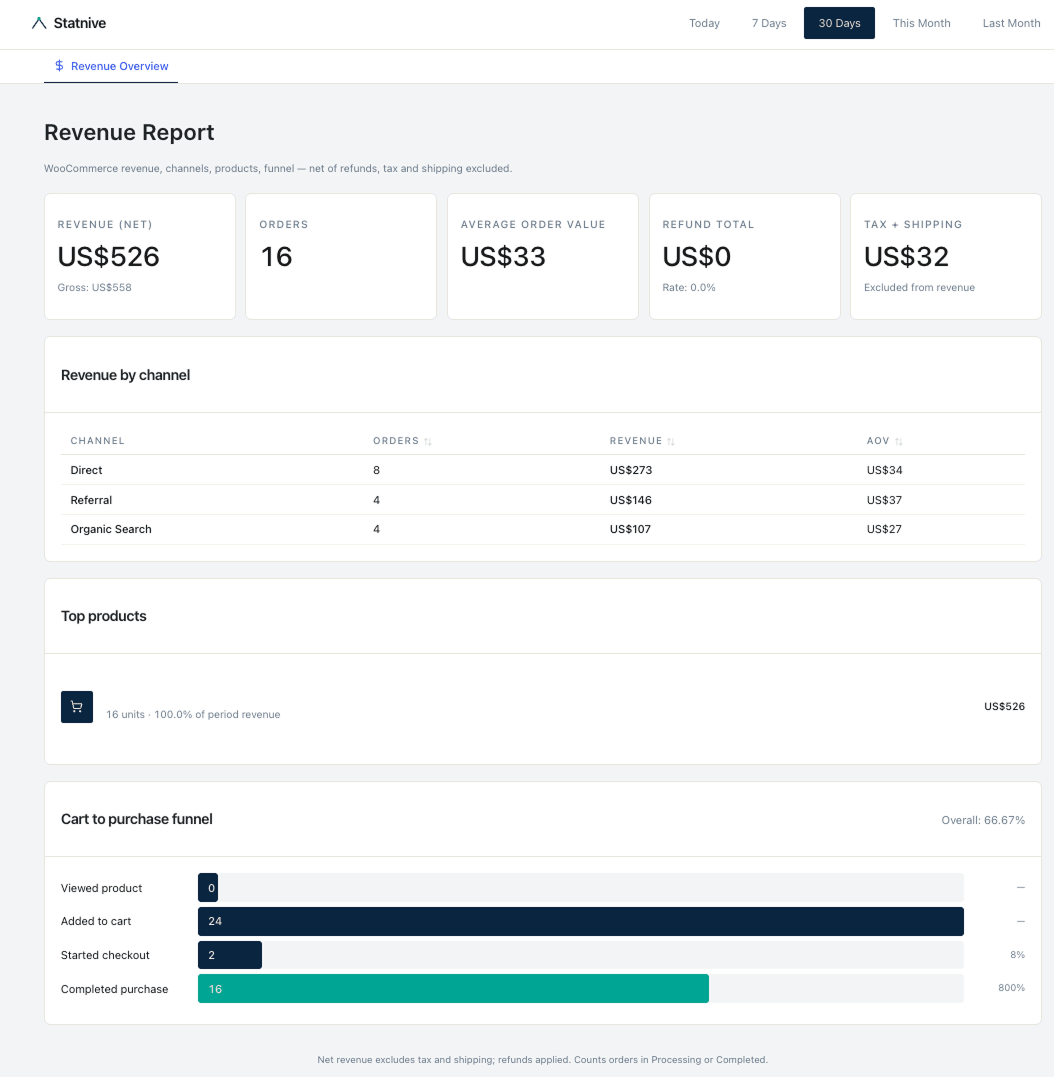
Status of the plugin as of v1.0.0 (May 2026):
| Feature | Status in v1.0.0 |
|---|---|
| Real-time visitor counter | ✅ Shipped (since 0.4.x) |
| Channel grouping (incl. AI Assistants channel, 14 LLM hosts) | ✅ Shipped |
| GeoIP (country + region + city, layered fallback) | ✅ Shipped (since 0.4.x) |
| Device / browser / OS detection | ✅ Shipped (since 0.4.x) |
| WordPress Privacy API exporter + eraser | ✅ Shipped (since 0.4.x) |
| DNT + GPC respected | ✅ Shipped (since 0.4.x) |
| Daily-rotating salts, SHA-256 hashing | ✅ Shipped (since 0.4.x) |
| HMAC-SHA256 signed tracker payloads | ✅ Shipped (since 0.4.x) |
| WP-CLI integration | ✅ Shipped (since 0.4.x) |
| WooCommerce Revenue Report (5 KPIs + Channel + Top Products + Funnel) | ✅ Shipped in v1.0.0 |
| WooCommerce zero-touch backfill via Action Scheduler | ✅ Shipped in v1.0.0 |
| HPOS + Block Checkout compatibility | ✅ Shipped in v1.0.0 |
| Anomaly alerts on revenue + Slack/Telegram alerts | ⏳ On the Growth 2026 roadmap |
| Ad-spend CSV import + MER (Marketing Efficiency Ratio) | ⏳ On the Growth 2026 roadmap |
| Weekly AI executive summary | ⏳ On the Growth 2026 roadmap |
| Form tracking (CF7, Gravity, WPForms) | ⏳ On the Growth 2026 roadmap |
| Heatmaps & Meta CAPI server-side | ⏳ On the Agency 2026 roadmap |
We’d rather under-promise on launch day and ship the rest publicly — in changelog entries you can audit — than vague-tweet a feature list you can’t verify in readme.txt.
Frequently asked questions
Is Statnive really free? Yes. The free tier on WordPress.org is the same plugin we’ll build the paid tiers on top of. It will stay free.
Does Statnive use cookies?
No. Visitor identity is derived from a daily-rotating salt, hashed with SHA-256, and never persisted in the visitor’s browser. There are no cookies, no localStorage, no sessionStorage, and no browser fingerprinting.
Is it GDPR compliant? Statnive is self-hosted. Visitor data never leaves your server. There is no third-party transfer and no international data flow with us. We register the WordPress Privacy API exporter and eraser so data-subject access and erasure requests work out of the box. Whether your specific use of any analytics tool requires consent is a question for your legal counsel, but Statnive removes the structural reasons that force most analytics tools to ask for it.
How does Statnive affect site performance?
The tracker is 2.4 KB gzipped, served from your own server with no third-party requests, and sent via sendBeacon so it never blocks navigation. Server-side, every query runs against properly indexed, normalized tables — we break down the engineering choices in our analytics plugin performance comparison.
Does it support WooCommerce? Statnive tracks pageviews, sessions, and channels on WooCommerce stores like any other WordPress site today. Dedicated revenue tracking and Revenue per Visitor (RPV) attribution are on the 2026 roadmap.
Why a dedicated AI Assistants channel? Traffic from ChatGPT, Claude, Perplexity, Gemini, and others has different intent, different conversion behavior, and different content needs than Google organic. Bucketing it under “Direct” or “Referral” hides one of the most important shifts in the open web. Statnive recognizes 13 named AI assistants out of the box.
Where can I report bugs or request features? Open an issue on github.com/statnive/statnive or use the WordPress.org support forum.
What’s next
If you run a WordPress site and you’ve been waiting for a privacy-first analytics tool that respects the page weight and the visitor’s data: it’s here, it’s free, and it’s two minutes away.
If you’re an early user — please leave a review on WordPress.org. The directory rewards plugins that ship value and respond to support threads. The early review momentum is what carries a plugin from “shipped” to “found.”
Install Statnive free from WordPress.org →
Free forever · Self-hosted · GDPR-compliant by design · GPL-2.0+ · No third-party transfer