AI tools sent you traffic (and you probably missed it): ChatGPT, Claude, Perplexity audit
GA4 added a native AI Assistant channel in May 2026 — both tools see Claude / ChatGPT / Perplexity. The difference: Statnive surfaces it zero-config. Open Ask me! → 「Are AI tools sending traffic?」 (q53) → done.
GA4 added a native AI Assistant channel in May 2026 — both tools see Claude / ChatGPT / Perplexity. The difference: Statnive surfaces it zero-config. Open Ask me! → 「Are AI tools sending traffic?」 (q53). Caveat: in-app browsers strip referrers, so some sessions still land in Direct on both tools.
Wheelhouse DMG’s 2026 analysis of AI traffic put it bluntly: “Most AI apps leave little to no fingerprint in GA4 or server logs, with sessions appearing as Direct”. That was true until May 2026, when Google rolled out a native “AI Assistant” channel grouping in GA4 covering ChatGPT, Claude, Perplexity, Gemini, Copilot and a handful more. Suddenly the traffic was findable in GA4 — if you knew the toggle existed, and if you knew the navigation path.
If you’ve spent the last year wondering whether AI tools were sending you traffic, the answer is almost certainly yes. The question is whether your analytics tool shows you the answer in one click or makes you build a channel-group config to find it.
This post walks the six relevant Ask me! questions (q53 + q48–q52), shows the GA4 path, names the 14 AI hosts Statnive hard-codes, and ends with the referrer-strip caveat that affects both tools equally.
What this post answers
- Why GA4 saw nothing before May 2026 and what changed when it did.
- The 14 AI hosts Statnive’s
AI Assistantschannel groups by default. - The in-app-browser caveat (ChatGPT / Claude desktop apps) — affects every analytics tool.
- How to break out AI traffic by host, then by landing page, then by trend.
- Why this signal matters for content investment in late 2026.
Why this used to be hard
Before May 2026, every AI-tool referrer was a mess. Three things broke at once:
- No native bucket in GA4.
chatgpt.comwas Organic Search (it’s a.comwith a search-like UX),gemini.google.comwas Direct or sometimes Social,claude.aiwas Direct because GA4’s referrer parser didn’t know it. There was no “AI” anything in Default channel grouping. - In-app browsers strip the referrer. The ChatGPT desktop app and the Claude desktop app open links in an embedded browser that doesn’t always pass a
Refererheader. The request arrives at your server clean — no UTM, no referrer, no source. Both GA4 and Statnive bucket those as Direct. - Some assistants don’t link out at all. Perplexity surfaces citations inline; users click them and visit your site. Gemini sometimes summarises and doesn’t link. Meta AI varies by surface. The “visit” you get is bursty and hard to attribute.
The result was that owners assumed AI tools weren’t sending traffic, when in fact a non-trivial slice of their “Direct” was Claude / ChatGPT / Perplexity referrals stripped of headers.
What changed in May 2026
Google added a native AI Assistant channel grouping in GA4 (Wheelhouse DMG, 2026). The covered domains include ChatGPT, Claude, Perplexity, Gemini, Copilot, and others. So today, GA4 can show you AI traffic — but only if you (a) know the channel-group exists, (b) navigate to the right report, and (c) apply the right filter.
Here’s the GA4 click-path for “Are AI tools sending me traffic?”:
- Admin → Data display → Channel groups → confirm “AI Assistant” channel is enabled (the May 2026 addition).
- Reports → Acquisition → Traffic acquisition.
- Change the dimension to “Session default channel group”.
- Filter for
Session default channel group = "AI Assistant". - Optionally add a secondary dimension to break out by
Session sourceto see ChatGPT vs Claude vs Perplexity.
Five steps. Two of them are config (steps 1 and 4). One of them depends on knowing that “Session default channel group” — and not “Session source / medium” or “First user default channel group” — is the right dimension. If you weren’t watching analytics news in May 2026, you don’t know any of this and your AI traffic stays invisible in your default Traffic acquisition view.
The privacy contract — five claims that hold for every Ask me! query
Before the Statnive callout: every Ask me! answer runs against your own MySQL database on your own server, through the same SQL the dashboard already runs. There is no AI model, no LLM, no embedding, no prompt, no Claude / ChatGPT / Gemini API call. The AdvisorController makes zero outbound HTTP calls. Your data never leaves your server; Statnive doesn’t host, mirror, or back it up anywhere. Tracking itself is cookieless: daily-rotating SHA-256 salt hashes mean the same visitor is a different hash tomorrow, and IPs are hashed → GeoIP’d → discarded. Ask me! is a question library, not a chatbot. Your data answers the question; your data never travels.
This is the part worth stressing on this post in particular: when you’re investigating whether AI tools are sending traffic, the last thing you want is your analytics tool to also be an AI tool that ships your data off-server. Statnive isn’t. The AI signal you read in Ask me! comes from referrer parsing — looking at the Referer HTTP header — not from any LLM or model on the Statnive side.
In Statnive: zero config, 14 hosts, one click
Statnive ships an AI Assistants channel hard-coded with 14 hosts plus a fallback bucket. The current list (v1.1.0):
ChatGPT (chatgpt.com, chat.openai.com), Claude (claude.ai, claude.com), Gemini (gemini.google.com, bard.google.com), Perplexity (perplexity.ai), Copilot (copilot.microsoft.com, bing.com/chat), NotebookLM (notebooklm.google.com), Meta AI (meta.ai), Le Chat by Mistral (chat.mistral.ai), DeepSeek (chat.deepseek.com), You (you.com), iAsk (iask.ai), Jasper (jasper.ai), Writesonic (writesonic.com), plus a generic AI-assistant fallback that catches anything matching the broader pattern.
The list grows with each release — see the v1.0.0 launch post for context on how channel grouping works in Statnive.
In Statnive: open Ask me! → click 「Are AI tools sending traffic?」 → done.
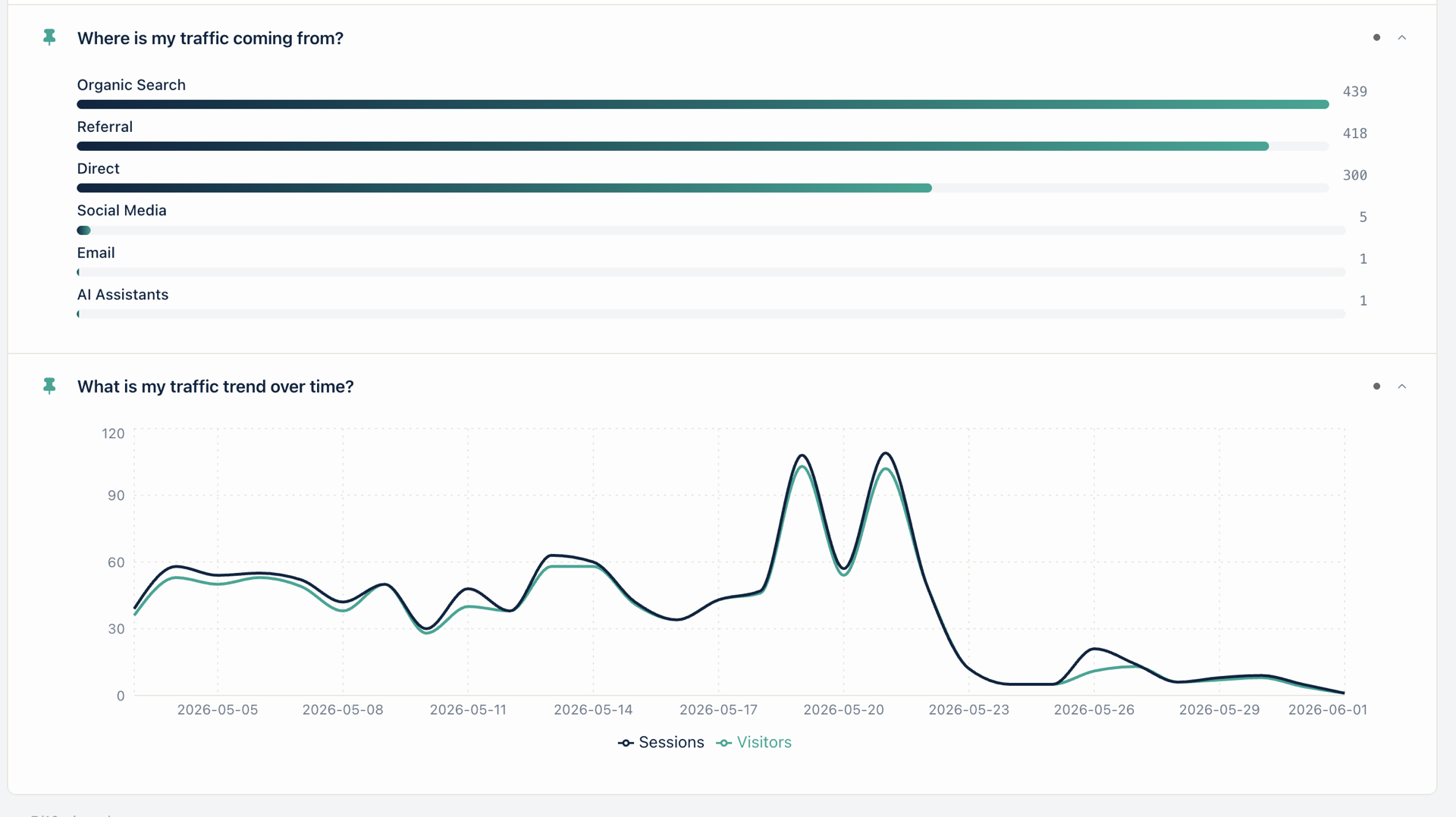
The hero screenshot above shows AI Assistants as a first-class channel row in the pinned channels card (count = 1 in this snapshot — small site, early signal, but it’s there alongside Organic 439, Referral 418, and Direct 380). No setup. The bar appears the first time an AI tool referrer hits your site.
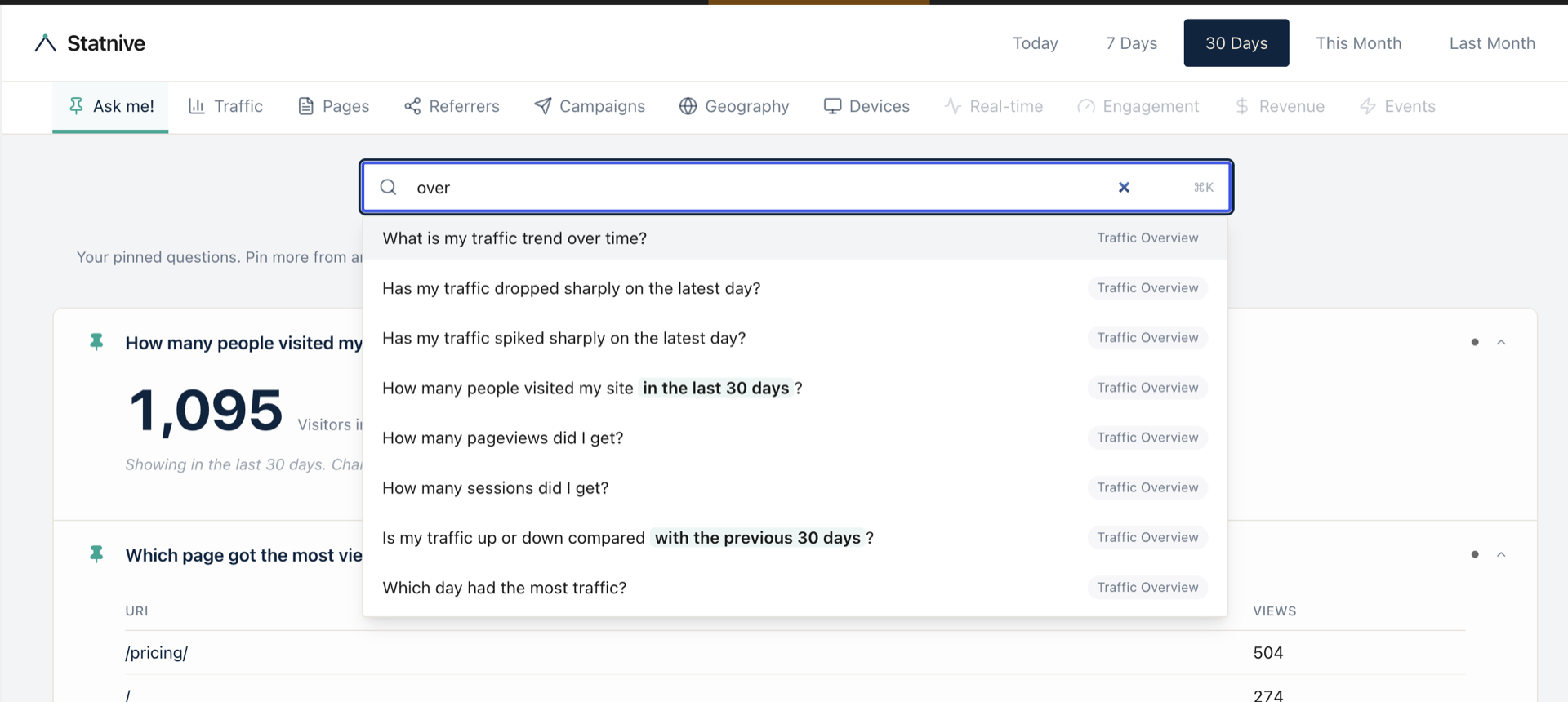
For the per-host breakdown, q53’s answer card splits AI Assistants into the 14 buckets above. Type “ai” into the search bar and q53 surfaces immediately:
The five social siblings (q48 Reddit, q49 Twitter/X, q50 Facebook, q51 Instagram, q52 YouTube) work the same way — pin them next to q53 and you have your full referral picture in one tab.
Why doesn’t GA4 show ChatGPT traffic?
If you’re still seeing zero AI Assistants in GA4 after May 2026, three things are likely:
- Your AI Assistant channel-group config isn’t enabled. Admin → Data display → Channel groups → make sure the May 2026 default is active for your property. New properties created after May 2026 should have it on by default; older properties may need a manual confirmation.
- You’re looking at the wrong dimension. “Session default channel group” carries the AI Assistant bucket. “First user default channel group” reflects historical bucketing. If you’re filtering on the wrong one, the AI traffic looks like it doesn’t exist.
- In-app browsers stripped the referrer. This is the irreducible caveat. The ChatGPT desktop app and Claude desktop app open links in a webview that often doesn’t propagate
Referer. Those sessions land in Direct on both GA4 and Statnive. There is no analytics-tool fix for this; it’s a client-side header decision.
The third point is worth underlining. Statnive doesn’t solve the in-app-browser problem because no analytics tool can. What Statnive does is document the caveat in the q53 answer itself — so when you see “AI Assistants: 47 sessions, ChatGPT app caveat applies” you know the number is a floor, not a ceiling. The actual ChatGPT traffic is probably 1.3–2× the visible number.
Which AI tool sends the most traffic?
The honest answer: read your own data, because the AI-tool mix varies dramatically by content type.
Some signal directions worth knowing, based on the patterns we’ve seen across early-adopter Statnive sites and what the AI-search-tracking community (PulseRank, Loamly, Wheelhouse DMG) has reported in 2026:
- Long-form research + developer content tends to over-index on Perplexity (which leans on citation-heavy answers) and Claude (the desktop app surfaces links explicitly).
- Consumer how-to skews ChatGPT, both web and app.
- Business-decision queries show up via Copilot — because Microsoft 365 users invoke Copilot inside Word, Outlook, and Edge, then click through.
- News / current events lean toward Gemini, which is the AI most integrated into Google Search itself.
But the actual mix on your site depends on your content, not the global distribution. q53’s per-host breakdown is the only honest source.
The 2026 baseline worth citing once: AI Overviews now appear on 47–64% of queries (Seer Interactive, Sept 2025), and they reduce informational-query CTR by 34–46%. The AI tools themselves (ChatGPT, Claude, Perplexity) are partially capturing the click that the SERP no longer sends — so the AI-Assistants channel growing is partly the inverse of the organic-search channel shrinking. See the sibling Is your traffic really down? post for the algorithm-versus-technical split.
How do I set up AI referral tracking?
In Statnive: there is no setup. Install the plugin, the channel appears the first time an AI referrer hits your site.
In GA4: enable the May-2026 AI Assistant channel-group config (Admin → Data display → Channel groups), then learn to filter Traffic acquisition by Session default channel group. Expect 4–5 clicks every time you want to check.
Either way, the data quality has the same floor: in-app browsers strip the referrer for an unknown share of AI sessions. The upper bound on tracking accuracy is set by the user’s browser, not by you.
Decision rule: how to use the AI Assistants signal
One sentence: track the AI Assistants channel weekly; treat double-digit week-over-week growth as a content-investment signal, not a vanity metric.
The expanded version:
- Pin q53 to your Ask me! home tab. Watch the weekly count. Trend matters more than absolute number — small sites often see AI Assistants under 5% of total traffic, and that’s fine.
- Cross-reference with your top pages (find them via q23 / q24 / q37). The pages AI tools cite most are the pages worth keeping fresh and worth expanding into related content.
- If a page is getting AI-tool traffic but no human search traffic, the AI tools have parsed your content for an answer but Google isn’t surfacing you in the SERP for the matching query. That’s a content-format opportunity — restructure the page for direct answerability (clear headings, definition-style opening paragraph, schema markup).
- Don’t optimise for AI tools specifically. The same content qualities that win citation in Perplexity (clear claims, sourced statements, recent dates) win in Google’s AI Overviews too. There’s no separate AI-SEO playbook; there’s just better, more answerable content.
What to do next
- Install or update to Statnive v1.1.0 and pin q53 to your Ask me! home. The AI Assistants channel populates from the first matching referrer onward.
- Audit your top pages for AI citation patterns. Cross-reference q53 with your top-pages list (see Find your real top pages). Pages cited often by AI tools are content-investment candidates.
- Read the channel-grouping background in Where’s your traffic actually coming from? and the v1.0.0 launch post on traffic sources to see how Statnive maps referrers to the 5–8 channel buckets.
- Diagnose any drop in organic search against AI Assistants growth. Open Is your traffic really down? — if organic is down but AI Assistants is up, AI tools are partially absorbing the SERP click loss. That’s an investment signal, not a defeat.
- Don’t expect a perfect number. In-app-browser referrer-strip means every analytics tool, including this one, undercounts AI traffic. Treat q53 as a directional floor that grows over time.
Install Statnive 1.1.0 free from WordPress.org →
Free forever · Self-hosted · No account · 2-minute setup · No AI · No third-party API · Your data never leaves your server.