Find your real top pages: views vs. evergreen vs. revenue-impact
Surface your top WordPress pages, most-read posts, and evergreen winners in one click. Statnive Ask me! ranks by views and date-decay — no GA4, no manual filter.
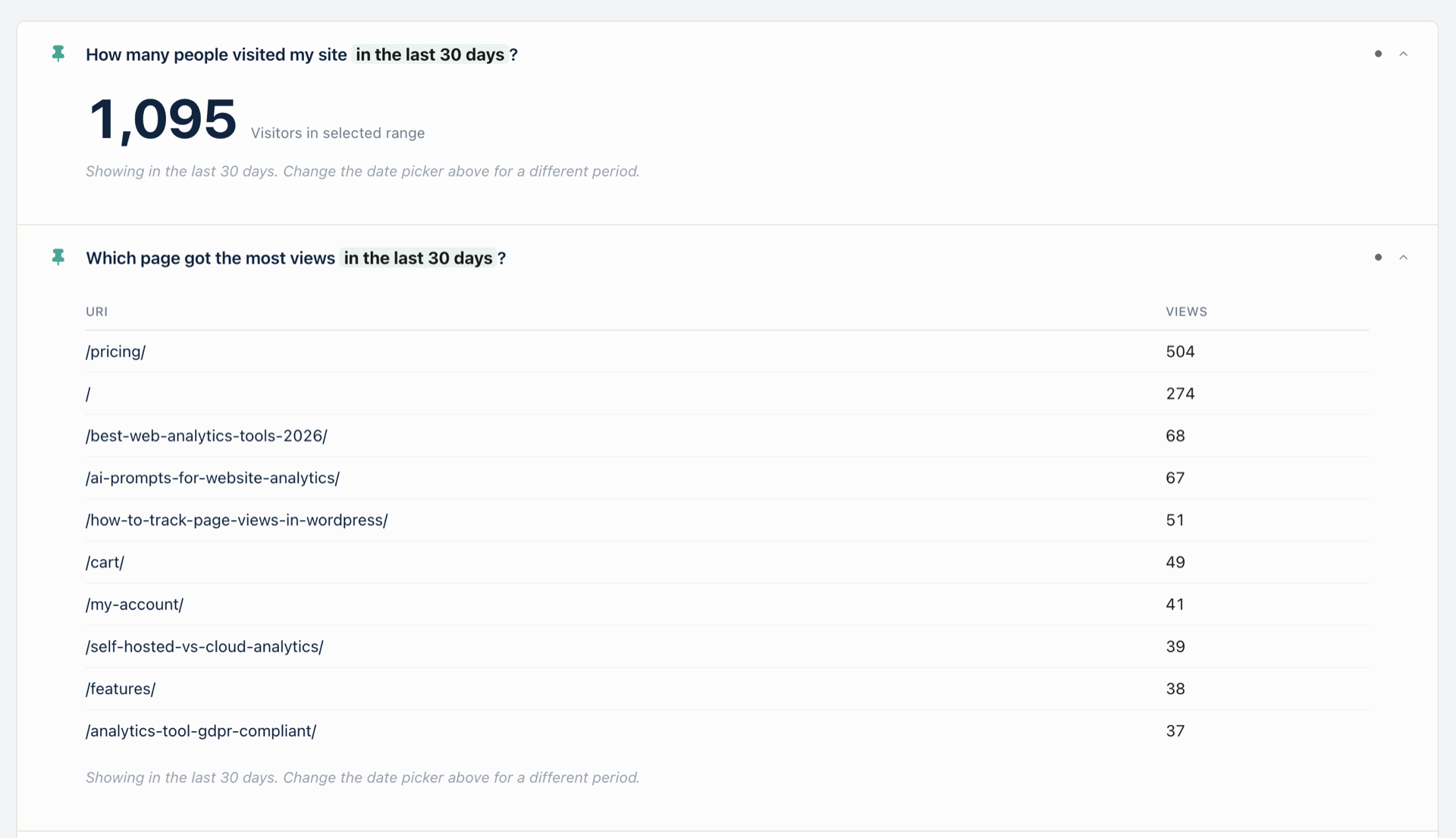
Your top pages aren’t your most-viewed — they’re the ones still pulling traffic 90+ days after publish. Open Ask me! → 「Which old posts still get traffic?」 (q37) for the evergreen winners by date-decay, plus 「What are my top pages?」 (q23) for the live ranking. No GA4 export, no manual filter.
A common pattern in WordPress publisher support threads, paraphrased from many: “I know /pricing/ is my top page — that’s not what I need. I need to know which 4-year-old blog post is still bringing in readers so I know what to update next, and which post I published last month flopped so I know what not to write again.” The first question is trivial; the second is the one that drives the editorial calendar. GA4 answers the first in 3 steps. The second, GA4 doesn’t really answer at all — there’s no built-in evergreen filter; you have to export Pages and screens and pivot in a spreadsheet.
This post walks the 6 Ask me! questions that cover top pages, most-read posts, latest-post-landed checks, and the evergreen filter shipped in v1.1.0. Plus the one decision rule the answers enable: which post you update next.
What this post answers
- The 6 Live Ask me! questions for pages, posts, and titles (q23, q24, q31, q32, q33, q37).
- The new
statnive_advisor_evergreen_daysfilter shipped in v1.1.0 — and what to tune it to. - How GA4 makes you build the evergreen view yourself (it doesn’t have one).
- The “views vs. evergreen vs. revenue-impact” decision rule for which post to update next.
- A verified 2026 benchmark on what’s actually happening to informational traffic — and why your evergreen winners are about to matter more, not less.
How GA4 answers it (and where the path runs out)
GA4’s click-path for top pages is short:
- Reports → Engagement → Pages and screens.
- Sort by Views (defaults to Views descending).
- Adjust the date range.
Three steps, no drama. The trouble starts when you want anything beyond “top by views in the current window.” GA4 has no built-in evergreen filter, no built-in age-of-content dimension, no built-in “posts only, not products or archives” view. To answer “which old posts still get traffic?” in GA4, you export Pages and screens, join on the WordPress post-published-date (which GA4 doesn’t have), pivot in Excel, and eyeball the rows where age > 90 days AND views > some threshold. Several support threads end in a giveup.
Statnive collapses that into one Ask me! question.
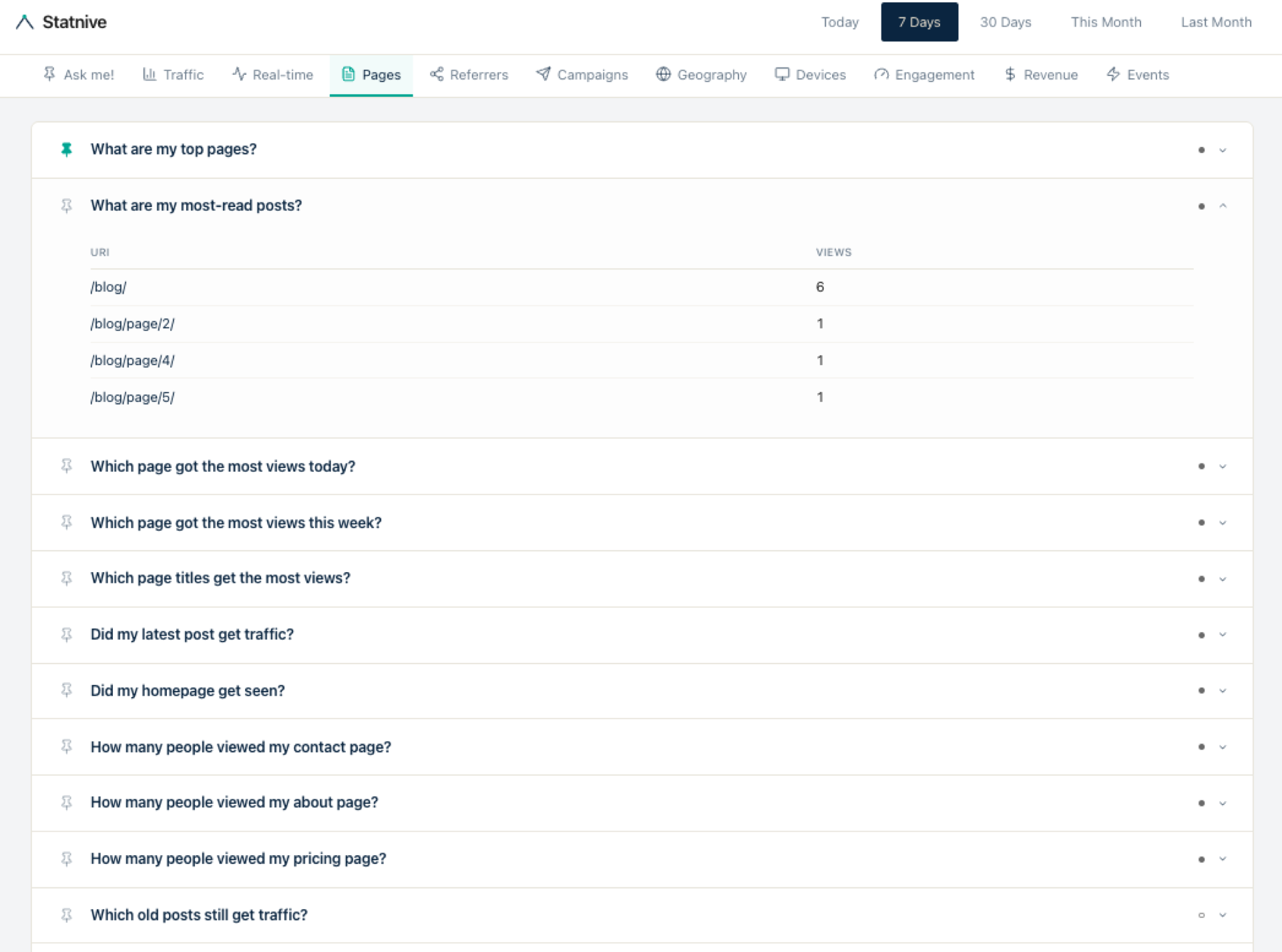
The 6 Live Ask me! questions for pages and posts
All six are Live in v1.1.0. Each runs against the same wp_statnive_visits table the dashboard’s Pages report already queried in v1.0.0 — zero new SQL.
- q23 「What are my top pages?」 — the full URL ranking by visits in the current window. The default home card. Pinned in the hero screenshot above showing
/pricing/504,/274,/best-web-analytics-tools-2026/68, and 7 more. - q24 「What are my most-read posts?」 — same ranking, filtered to WordPress posts only. Products, archives,
/cart/,/my-account/,/checkout/are excluded. - q31 「Which page titles get the most views?」 — ranks by
post_titleinstead of URL. Useful when the same page has been re-slugged (a redirected post still gets credit) or when you want titles in the report, not paths. - q32 「Did my latest post get traffic?」 — identifies your most recently published post by
post_date, then shows its visit count in the current window. Pin this if you publish weekly; one card answers “did this land?”. - q33 「Did my homepage get seen?」 — homepage visit count. Useful as a sanity check after a redirect change or a navigation refactor.
- q37 「Which old posts still get traffic?」 — the evergreen winners. Filters to posts with
post_dateolder thanstatnive_advisor_evergreen_days(defaults to 90) AND visits above a small floor in the current window.
The statnive_advisor_evergreen_days filter — new in v1.1.0
Evergreen isn’t a universal threshold. A news site’s evergreen cutoff is 30 days; a tutorial site’s is 180; a B2B SaaS blog’s is closer to 365. So v1.1.0 ships a WordPress filter — statnive_advisor_evergreen_days — that lets you tune q37’s age cutoff per site:
// In your theme's functions.php or a tiny mu-plugin
add_filter( 'statnive_advisor_evergreen_days', function ( $days ) {
    return 180; // Or 30 for news, 365 for B2B SaaS
} );
The default is 90 — the rough industry midpoint where “still getting traffic this far after publish” stops being normal post-launch decay and starts being a real evergreen signal. If your default ranking surfaces posts that are clearly still in their launch tail, raise the cutoff. If it surfaces almost nothing, lower it.
Five things hold for every Ask me! answer
Short version, every post repeats it:
- No AI. No LLM. Ask me! is a curated library of 117 hand-written questions. Each question runs the same SQL the dashboard already ran in v1.0.0 — no model, no prompt, no embedding, no ChatGPT/Claude/Gemini API call.
- No third-party API. Zero outbound calls from the Ask me! pathway.
- Nothing leaves your server. The REST endpoint sits on the same WordPress install; no relay, no proxy, no CDN-cached endpoint.
- You own the data. Uninstall and the rows live on in your MySQL until you choose to drop the tables.
- Cookieless. No fingerprinting. No third-party trackers. Daily-rotating SHA-256 salt hashes; IPs hashed → GeoIP’d → discarded ephemerally.
Ask me! is a question library, not a chatbot. Your data answers the question; your data never travels.
In Statnive: open Ask me! → click 「What are my top pages?」 → done.
That’s the path for q23. The card renders the URL ranking in the hero image above — /pricing/ 504, / 274, /best-web-analytics-tools-2026/ 68 — using the dashboard date picker’s current window. Click into any row and the answer modal drills to a per-URL traffic-over-time chart.
For the evergreen view, click Which old posts still get traffic? (q37) instead. Same data, different filter. The combination is the editorial-decision pair you keep open while planning content.
The decision rule: top + evergreen + decay = your update queue
Owner takeaway in one paragraph: open q23 to see what’s currently winning attention, open q37 to see what’s been winning attention for months, compare. The posts in q37 but not in q23 are your evergreen tail — they earn traffic without help, week after week, and updating them is the highest-ROI editorial work you can do. The posts in q23 but not in q37 are your launch tail — recent posts riding their publish-week boost, which will either join the evergreen list in a few months or fade. The posts in both are your anchor pages — the small set of URLs your whole site is built on, and the ones you should never let go stale.
The 2026 urgency frame: AI Overviews now appear on 47-64% of queries (Seer Interactive, Sept 2025 update), and informational queries are losing 34-46% of clicks (Search Engine Land, Sept 2025). The posts that survive that compression are the ones AI Overviews cite — and AI Overviews cite the same evergreen winners that were already ranking well in regular search. Your q37 list isn’t just your update queue. It’s also your “what AI tools are pulling answers from” list. Worth updating first.
What are my top performing pages?
Your top performing pages are the URLs that earn the most visits in the window you care about — typically /pricing/, your homepage, and one or two evergreen blog posts. Open Ask me! and click What are my top pages? (q23) for the live ranking. Statnive sorts by Views from your own MySQL — no GA4 export, no manual filter, no spreadsheet pivot. The default window follows the dashboard date picker, so changing the picker to 7 days or 90 days re-ranks the card in place.
How do I find most popular blog posts?
Open Statnive Ask me! and click What are my most-read posts? (q24). The card filters the page list to WordPress posts only — products, archives, and the cart/checkout pages are excluded — and ranks by views in the current window. Pin q24 to your home tab if you publish weekly and want a one-card check on which post landed. For the evergreen view (posts 90+ days old still pulling traffic), use q37 Which old posts still get traffic? alongside it.
Which pages drive the most traffic?
Two Ask me! questions cover this. q23 What are my top pages? ranks every URL by visits, including product and pricing pages — useful for marketing-decision context. q37 Which old posts still get traffic? ranks posts that are 90+ days old by date-decay analysis — these are your evergreen winners, the ones still pulling traffic months after publish, and the ones to update first. Tune the 90-day cutoff with the statnive_advisor_evergreen_days filter if your industry’s evergreen window is shorter or longer.
What to do next
- Install Statnive 1.1.0 from WordPress.org if you haven’t already. Free, self-hosted, 2-minute setup.
- Open Ask me! → pin q23 and q37 to your home tab. This is the editorial-decision pair: live ranking + evergreen list, side by side.
- Tune the evergreen cutoff if 90 days isn’t right for your site. News → 30. SaaS blog → 180. Industry archive → 365.
- Cross-reference q37 with q24 「What are my most-read posts?」. The posts in q37 but not in q24 are your sleeping winners — strong evergreen traffic but no recent share-spike. Updating these is the highest-ROI work.
- Read the pillar post on Ask me! for the full 117-question library, the Solo WooCommerce CRO playbook for the weekly content-and-conversion loop these pages fit into, and the Entry & Exit Pages post for the per-URL conversion lens that pairs with the top-pages view.
That’s the workflow. Two pinned cards, six questions, no GA4 export, no spreadsheet pivot. Your data answered the question; your data never travelled.
Install Statnive 1.1.0 free from WordPress.org →
Free forever · Self-hosted · No account · 2-minute setup · No AI · No third-party API · Your data never leaves your server.