Meet Ask me!: 116 questions about your WordPress traffic, answered in seconds
Statnive v1.1.0 ships Ask me!, a question library of 116 owner-voice prompts about your traffic, pages, channels, and revenue. No AI. No LLM. No third-party API. Free.
Ask me! ships 116 owner-voice questions about your WordPress traffic — 63 answer in one click today; the rest land on the v1.2 + Growth plan timeline. Default pinned 5: visitors this week, traffic sources, top pages, countries, mobile vs desktop. No AI. No LLM. No third-party API. Free.
Statnive v1.1.0 is live on WordPress.org today, and the headline feature is Ask me! — a new admin tab that flips the dashboard on its head. Instead of showing a wall of charts and asking you to find the one that matters, Ask me! asks you what you want to know. You type or pick the question; it shows the answer. Owner voice in. Answer card out.
Install Statnive 1.1.0 from WordPress.org →
Free forever · Self-hosted · No account · 2-minute setup
What this post answers
- What Ask me! actually is — and what it deliberately isn’t.
- Why we shipped 116 hand-written questions instead of a chatbot.
- What the 10 categories cover, and which 63 questions answer today.
- How pinning works, what the default 5 are, and why they were picked.
- What lands in v1.2 (free tier) versus the Growth v2 paid tier.
Ask me! is a question library, not a chatbot
The first thing to know about Ask me! is what it isn’t.
It isn’t an AI assistant. It isn’t a LLM-wrapped Q&A. It doesn’t ship your data plus a prompt to OpenAI, Anthropic, Google, or anywhere else. It doesn’t generate, infer, or “understand” anything. The 116 questions are hand-written strings in statnive/src/Advisor/Questions.php. The 63 answer-rendering handlers are hand-written PHP case statements in QuestionResolver.php. The SQL behind each answer is the same SQL the dashboard’s report tabs already ran in v1.0.0 — zero new queries, byte-identical numbers.
This matters because the alternative pattern is everywhere now. MonsterInsights ships “Conversations AI” which sends your analytics data plus a prompt to an LLM. Several “AI analytics” startups in 2026 do the same. Even the privacy-first cloud-SaaS analytics tools (Plausible, Fathom, Simple Analytics) run on the vendor’s servers — your data leaves your box even if no LLM is involved.
Statnive doesn’t. Five claims hold for every Ask me! query:
- No AI. No LLM. The 116 questions are hand-written; the answers are hand-written SQL.
- No third-party API. Zero outbound calls from the Ask me! pathway. The
AdvisorControllerdoesn’t importwp_remote_*. - Nothing leaves your server. REST endpoint sits on the same WordPress install; no relay, no proxy, no CDN-cached endpoint, no telemetry beacon.
- You own the data. Statnive does not host, mirror, syndicate, or back up the data anywhere. Uninstall and the data lives on in your database until you choose to drop the tables.
- Cookieless. No fingerprinting. No third-party trackers. Daily-rotating SHA-256 salt hashes; IPs hashed → GeoIP’d → discarded ephemerally.
Ask me! is a question library, not a chatbot. Your data answers the question; your data never travels.
The 10 categories — and the 63 questions that answer today
Ask me! is organized into 10 tabs. Each tab maps to one of the dashboard’s reports, plus a few cross-cutting categories. Here’s the breakdown by category, with the live-versus-coming-soon counts (mirrors Questions::all() and QuestionResolver in the plugin source):
| Tab | Total | Live today | Coming soon (free, v1.2) | Coming soon (Growth v2 paid) |
|---|---|---|---|---|
| Traffic overview | 10 | 9 | 0 | 1 |
| Real-time + tracking health | 10 | 8 | 0 | 2 |
| Pages & content | 17 | 10 | 4 | 3 |
| Referrers & channels | 16 | 15 | 0 | 1 |
| Campaigns & UTM | 14 | 10 | 0 | 4 |
| Geography & language | 9 | 4 | 0 | 5 |
| Devices & browsers | 12 | 7 | 1 | 4 |
| Engagement & quality | 8 | 0 | 2 | 6 |
| Revenue | 15 | 0 | 0 | 15 |
| Events & privacy | 5 | 0 | 0 | 5 |
| Total | 116 | 63 | 7 | 46 |
(Split by tier: 59 free questions, 57 paid questions. Of the 59 free, 53 answer today and 6 land in v1.2 when a small schema migration adds entry_count, exit_count, and avg_time_on_page columns. Of the 57 paid, 10 answer today against existing v1.0.0 SQL; the remaining 46 unlock with Statnive Growth v2.)
The 46 paid-tier “Coming soon” questions render a card with the message “Unlocks in Statnive Growth v2” — and yes, this looks exactly like what it is, an honest “we haven’t shipped this yet” state. You can see it live on the Revenue tab:
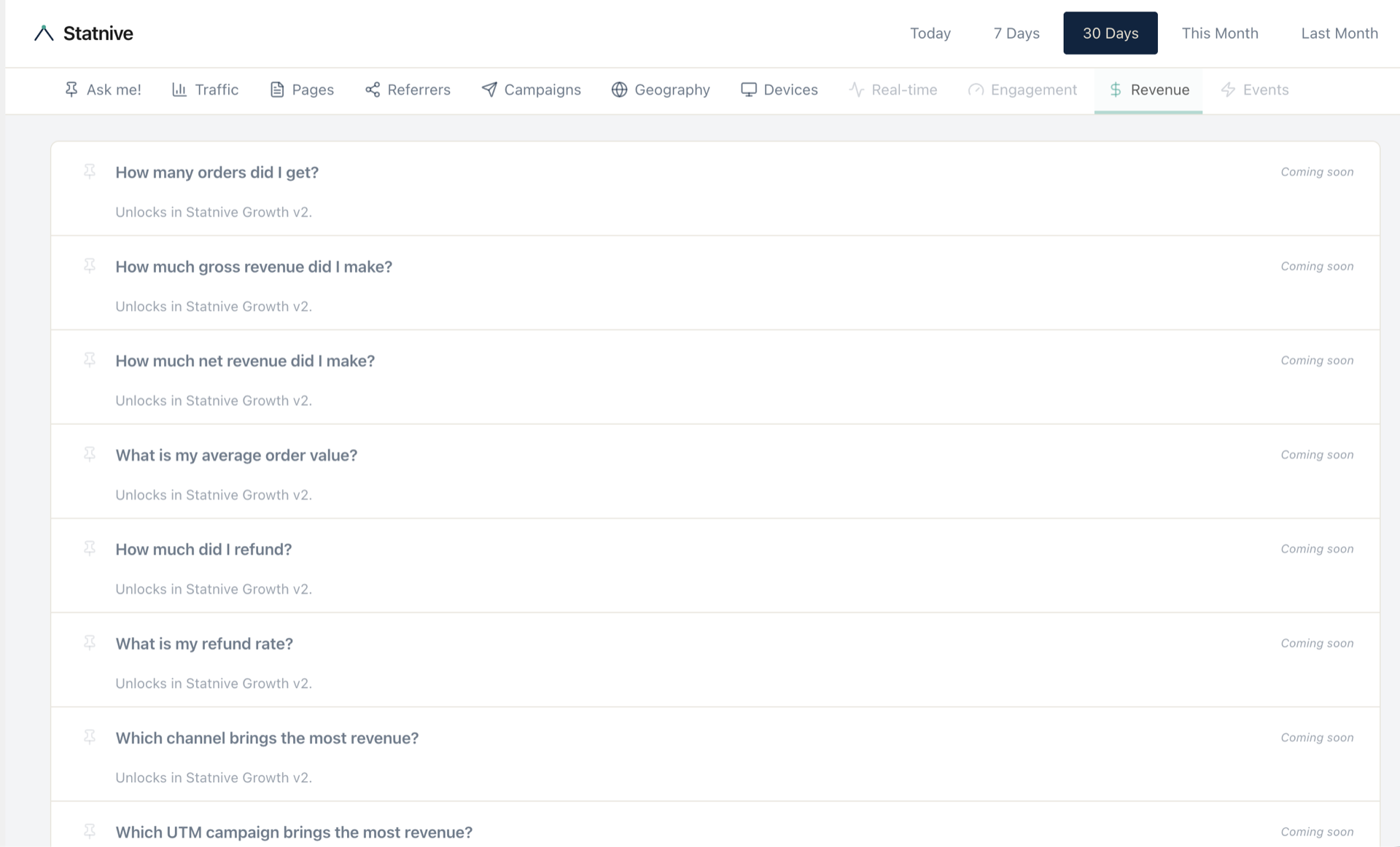
This is deliberate. The v1.0.0 Revenue Report (the dashboard report) is shipping today on the free tier. The Ask me!-flavoured revenue cards — channel × revenue, UTM × revenue, AOV, refunds — gather under the Growth v2 plan when it ships. We’re showing the path on day one so you know exactly what’s coming and exactly what isn’t.
The default pinned 5 — and why these five
Open Ask me! on a fresh install and you see five pinned cards by default. The exact list — and its order — comes from UserPreferences::default_pinned() in the plugin: [ 'q2', 'q41', 'q23', 'q72', 'q81' ]. In owner voice:
- q2 — “How many people visited my site
%s?” The%sis the date-range from the dashboard date-picker (e.g. “today”, “in the last 30 days”, “this month”) — substituted client-side. Baseline traffic. The number every owner checks first. - q41 — “Where is my traffic coming from?” Channel breakdown. The one chart that drives most marketing decisions.
- q23 — “What are my top pages?” Where attention is going. Useful for content + product decisions.
- q72 — “What countries are my visitors from?” Geographic distribution. Useful for shipping, localization, compliance.
- q81 — “How much traffic is mobile vs desktop?” Device split. Useful for design priorities and conversion analysis.
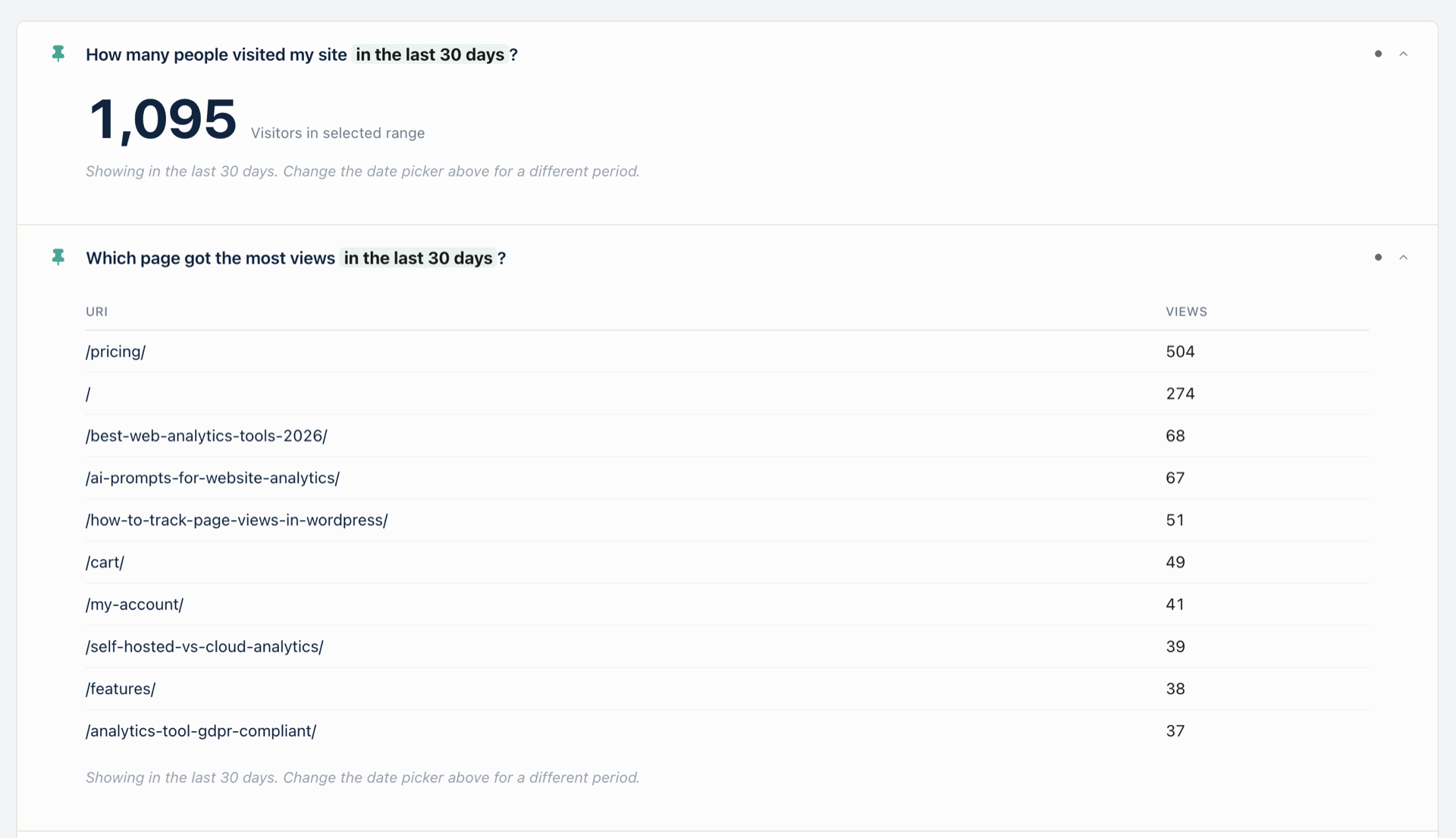
Here’s what the home page looks like with two pinned cards expanded — q2 showing 1,095 visitors in the selected 30-day window and the Pages tab’s q26 (“Which page got the most views %s?”) showing the live top-pages table (/pricing/ 504, / 274, /best-web-analytics-tools-2026/ 68, etc.):
You can swap any of the five for any other question — pin q9 “What is my traffic trend over time?” if you watch trend lines daily; pin q53 “Are AI tools sending traffic?” if you’re tracking ChatGPT / Claude / Perplexity referrals; pin q57 “Did my campaign drive traffic?” during a paid push. The pin preference is stored in wp_usermeta on your own database — Statnive doesn’t track who pinned what.
The killer feature: type-to-find
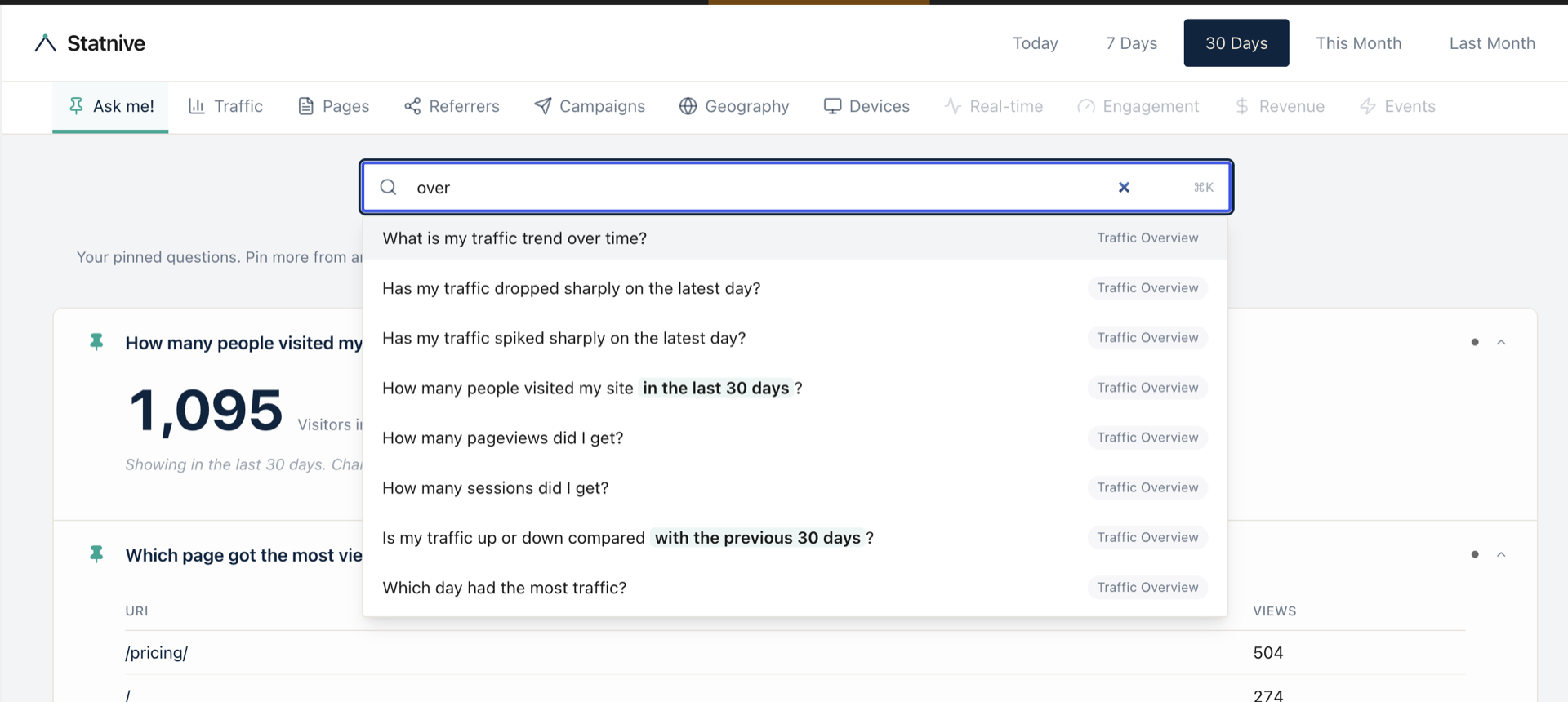
The most useful thing in Ask me! is the search bar. Type a few characters; it surfaces every matching question across every category. Type “over” and you see eight Traffic Overview questions in a list, ranked by match strength:
The search runs entirely client-side in the React SPA — no network call, no debounced API hit. You type, the list filters. Pick a question, the AnswerModal opens. Here’s what the search dropdown looks like with the query “over”:
The bar maps to the dropdown in the hero image above. The list of matched questions is sourced from Questions.php at boot; no fuzzy matching, no LLM, just a simple substring + token-rank pass. It’s fast because it has to do almost nothing.
How GA4 answers these questions — and how Ask me! does
Take the simplest one — q2, “How many people visited my site in the last 30 days?”. This is what GA4 makes you do:
- Open analytics.google.com → pick your property.
- Reports → Reports snapshot → look at the Users card.
- Change date range to “Last 30 days” → confirm comparison toggle is off.
- Read the number.
Four steps. Three of them are navigation tax. The number itself you needed to see in two seconds.
In Statnive: open Ask me! → click 「How many people visited my site in the last 30 days?」 → done.
That’s the pattern every Ask me! card follows. The question is hard-coded; the answer is your data; the path is one click. Multiply that across 63 Live questions and the time savings compound — not because Statnive is faster than GA4 (it isn’t, both are databases), but because the navigation is collapsed.
What ships in v1.1.0
The version live on WordPress.org today is 1.1.0, the changelog reads:
- New: Ask me! Advisor admin page with 11 in-page tabs, 116 owner-phrased questions, per-user pinning, search + AnswerModal, dynamic time-based questions following the date picker.
- New: Line chart viz (for q9 traffic trend), recommendation viz, Yes/No chip on delta viz, top-X label on KPI tile.
- New:
statnive_advisor_evergreen_daysfilter — site owners can tune the cutoff for q37 “Which old posts still get traffic?”. - Changed: WC Revenue date bucketing uses
COALESCE(date_paid_gmt, date_created_gmt)so renewals + delayed-payment orders land on the right day. - Changed: Funnel “Overall %” denominator switched to widest-step; per-step UI shows conversion %, not drop %.
- Changed: Inventory consolidated 120 → 116 (q1, q5, q25, q63 removed as duplicates or degenerate hard-codes).
- Fix: q47 Direct-visits undercount, q46 social-network missing platforms, q42/q73/q82 top-X tiles, q10/q11 anomaly Yes/No clarity, plus 6 more user-reported card fixes.
The full release notes live at /changelog/1.1.0.
The supporting series
Ask me! ships with 116 questions, but no individual owner will use 116. They’ll find five or six that map to their actual operating routine and rely on those. To show what that looks like, supporting posts in this series each take one cluster of questions and walk through:
- The question (verbatim from
Questions.php). - The pain point an owner has when they want to ask it.
- How GA4 forces them to find the answer.
- How Ask me! shows it in one click.
- The decision rule the answer enables, with a 2026 benchmark anchor.
Links to each supporting post will appear here as they go live. Bookmark /blog and check back.
What to do next
If you already run Statnive:
- Update to v1.1.0 from WordPress → Plugins. The update is non-breaking and ships fresh on next admin pageview.
- Open Ask me! in the Statnive admin tab. Watch the search bar surface questions as you type.
- Pin your 5. The default pins are good defaults, not the right ones for you. Swap in whichever questions map to your operating routine.
- Subscribe to the changelog at /changelog if you want to know when the 16 schema-gap questions and the Growth v2 revenue cards land.
If you don’t run Statnive yet:
Install Statnive 1.1.0 free from WordPress.org →
Free forever · Self-hosted · No account · 2-minute setup · No AI · No third-party API · Your data never leaves your server.