Did your campaign actually work? UTM setup that stops attribution chaos
Track UTM campaign traffic without GA4 chaos. The 5-rule UTM discipline, the iOS 17 click-ID strip, and the Statnive Ask me! card that answers 'did my campaign drive traffic?' in one click.
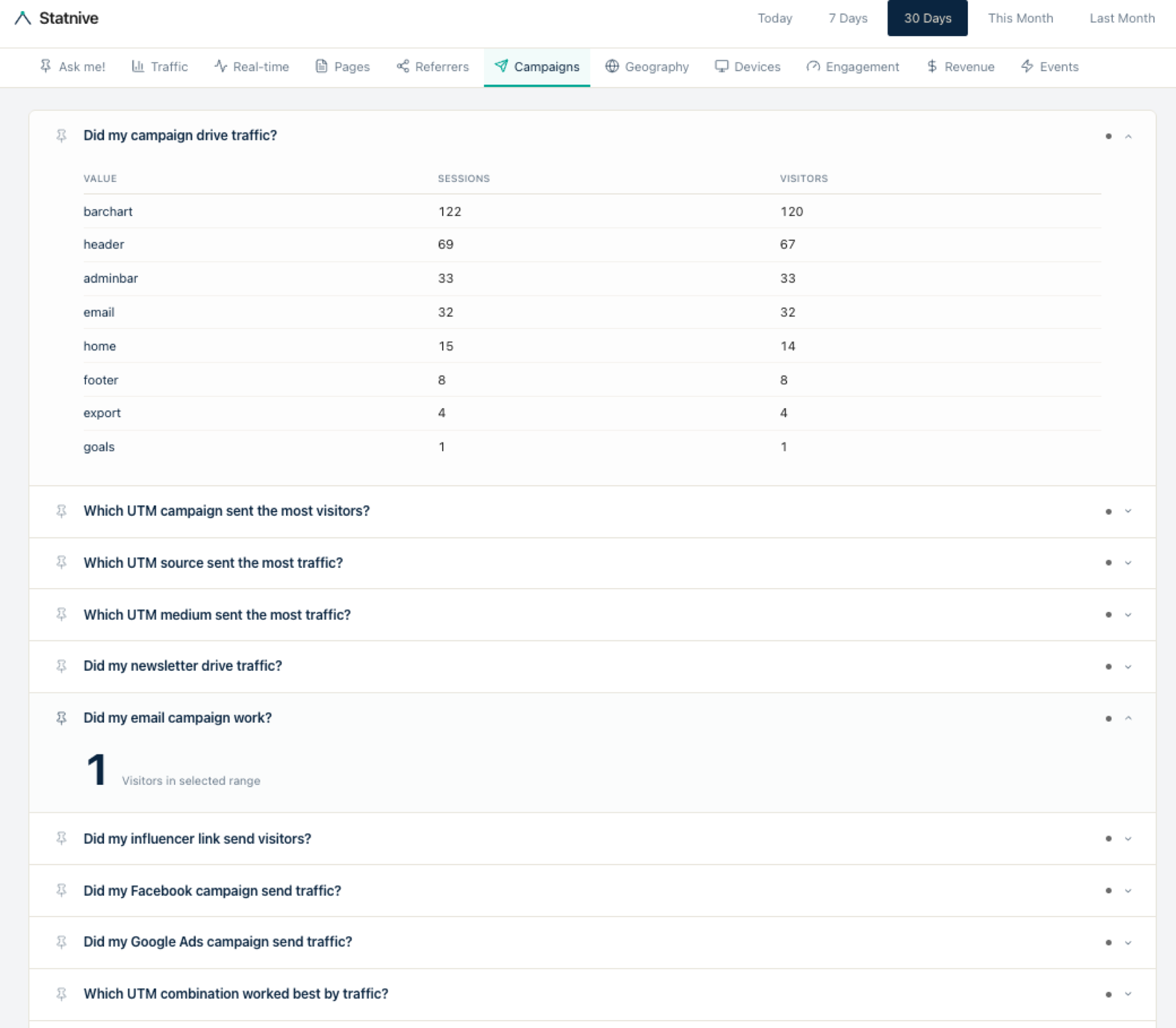
UTMs answer ‘did my campaign work?’ — Statnive captures all 5 (source/medium/campaign/content/term) at ingest, no cookie required, ad-blocker resistant. Open Ask me! → 「Did my campaign drive traffic?」 (q57). And cite: iOS 17 preserves utm_ and strips only click-IDs.*
You sent a newsletter on Tuesday. Wednesday morning the inbox is quiet, but Stripe shows three orders that weren’t there at 5pm yesterday. Did the newsletter do it? The Instagram boost? The Reddit thread? Or did three people just walk in through brand search after the email reminded them?
UTMs were invented in 2005 to answer that question, and twenty years later it’s still the question solo WordPress owners get wrong most often — not because the spec is hard, but because UTM discipline is the process work everyone skips until the first campaign that costs real money fails to attribute. This post is the discipline guide: the five-rule UTM contract, the iOS 17 carve-out that decides whether your campaign survives the click, and the Ask me! card that collapses GA4’s five-click cross-tab into a single question.
What this post answers
- What the five UTM parameters do, in one table.
- The 5-rule UTM discipline that prevents 90% of attribution chaos.
- Why iOS 17 strips
fbclidandgclidbut preservesutm_*. - How GA4 makes you cross-tab the campaign view, and how Ask me! collapses it.
- The decision rule: did the campaign work, and what does “worked” mean?
The five UTM parameters, decoded once
UTMs are five URL query parameters that travel with every click. They survive the redirect, the consent banner, and — critically for 2026 — iOS 17.
| Parameter | What it answers | Example | Notes |
|---|---|---|---|
utm_source | Where does this link live? | newsletter / instagram / facebook | The platform. Always lowercase. |
utm_medium | How does the link travel? | email / cpc / social / referral | The channel type. email → Email bucket; cpc → Paid Search. |
utm_campaign | Which initiative? | spring-sale-2026 | One stable name per initiative. |
utm_content | Which creative variant? | hero-cta / footer-cta | Optional. A/B variant attribution. |
utm_term | Which keyword? | wordpress+analytics | Optional. Mostly paid search. |
That’s it. Five strings, hard-coded into the URL, read at the visit. No JavaScript, no library, no SDK, no consent banner. The browser passes the URL to your server; Statnive’s tracker reads ?utm_source=…&utm_medium=…&utm_campaign=… and stores it.
The 5-rule UTM discipline (this is the whole post in 30 lines)
The biggest mistake on solo WordPress sites is inconsistent tagging, not missing tags. Half-tagged is worse than untagged because it produces wrong numbers that look right.
Rule 1 — Lowercase everything. Always.
utm_source=Facebook and utm_source=facebook are two different rows in your campaigns table. So are Newsletter and newsletter, CPC and cpc. The fix: everything is lowercase, hyphens instead of spaces. utm_campaign=spring-sale-2026, not Spring Sale 2026. This rule alone fixes the most common campaign-tab problem — the table showing facebook 412 and Facebook 38, both the same campaign, neither summing to the real number.
Rule 2 — One vocabulary per platform, written down
Pick a stable utm_source value for each platform and never change it. facebook, instagram, newsletter (not email or the platform name — newsletter is the audience description, which survives platform migrations). For utm_medium, use the GA4-native taxonomy: email, cpc, social, referral, display, affiliate. Statnive’s channel grouping reads these medium values to map sessions into the Email / Paid Search / Social Media buckets; custom mediums land in Referral. Write the vocabulary down — Notion page, campaigns-folder README, back of a Post-it. The act of writing it down is what stops future-you inventing a new variant at 2am.
Rule 3 — Never UTM internal links
This is the mistake that nukes attribution most thoroughly. You send a newsletter; it links to /spring-sale/; the spring-sale page has a “Shop now” button to /shop/?utm_source=spring-page&utm_medium=internal. When the visitor clicks that button, the tracker reads the new UTM and overwrites the original newsletter source. The campaign that actually drove the visit now gets credited to your own page.
The rule: UTMs only appear on links that arrive from outside your site. No exceptions. Internal A/B tests use a different parameter — ?variant=hero-cta — that Statnive ignores for channel attribution.
Rule 4 — Tag every shareable link, even the “obvious” ones
The trap: “I don’t need to UTM-tag my email because Klaviyo’s reports already tell me.” That’s fine inside Klaviyo. But the Statnive visit log and your WooCommerce order log only know what the URL told them. An untagged email link is indistinguishable from a Google brand search — both land in Direct or Organic. Rule of thumb: if you have control over the URL, tag it. Newsletters, paid ads, Reddit posts you make yourself, the link in your Twitter bio. Untagged links are fine for places you can’t control — that’s what the Referral bucket is for.
Rule 5 — Document the scheme. Stop reinventing.
Keep a single source of truth for your UTM vocabulary — one page, four answers: which utm_source values exist, which utm_medium values exist, how to name a new campaign (kebab-case-description-yyyy-mm), where to check if a campaign was tagged correctly (Ask me! → q57). The cost is one hour. The cost of running campaigns without it is the entire attribution layer being noise. The deep version of this discipline — per-platform link-builder cheatsheets, Klaviyo / Meta / Google Ads integration patterns — lives in the existing UTM campaigns guide for WooCommerce.
Why iOS 17 changed the stakes
Apple shipped iOS 17 / iPadOS 17 / macOS Sonoma in September 2023 with Link Tracking Protection — active in Safari Private Browsing and Messages. When the user clicks a link, the OS strips a known set of tracking parameters before the request goes out.
Stripped: fbclid (Facebook), gclid (Google Ads), mkt_tok (Marketo), HubSpot tokens (_hsenc, _hsmi), and other vendor-specific parameters Apple classifies as fingerprint-grade. Preserved: utm_source, utm_medium, utm_campaign, utm_content, utm_term.
This carve-out is the entire 2026 reason to lean on UTMs over click-IDs. Both Knak’s technical breakdown and Segmetrics’ detailed analysis confirm the same conclusion: utm_* is a standardised, transparent campaign vocabulary the user can read in the URL bar, so Apple leaves it alone; click-IDs are vendor-private identifiers Apple categorises as silent tracking. In practical terms: a Facebook ad depending only on fbclid will look like Direct or Referral after an iOS click; the same ad with ?utm_source=facebook&utm_medium=cpc&utm_campaign=spring-sale-2026 survives intact. Never trust click-IDs alone in 2026. Pair every paid link with a full UTM tagset so the campaign survives Safari, the in-app browsers, and whatever the next privacy update strips.
How GA4 answers it
GA4 has the data. The path: Reports → Acquisition → Traffic acquisition → click ”+” to add Session campaign as the secondary dimension → filter by campaign name → if missing, swap the primary dimension and double-check casing. Five to six clicks, and you still don’t see content and term unless you swap dimensions again. In GA4’s strict matching, facebook and Facebook produce two rows that don’t add up. The owner who ran the campaign now spends ten minutes deciding which row is the “real” one before they can answer the question.
Why Statnive sees campaigns differently
Five claims hold for every Ask me! query, including the campaign cards:
- No AI. No LLM. The 117 questions are hand-written; the answers are hand-written SQL.
- No third-party API. Zero outbound calls from the Ask me! pathway. The
AdvisorControllermakes nowp_remote_*request. - Nothing leaves your server. REST endpoint sits on the same WordPress install; no relay, no proxy, no CDN-cached endpoint.
- You own the data. Statnive does not host, mirror, syndicate, or back up the data anywhere.
- Cookieless. No fingerprinting. No third-party trackers. Daily-rotating SHA-256 salt hashes; IPs hashed, GeoIP’d, and discarded ephemerally.
UTM capture works at first-request time: the tracker reads the query string, lowercases utm_* values at ingest so Facebook and facebook reconcile to one row, and stores all five parameters against the daily-rotating visitor hash. No cookie banner can block the read because there is no cookie. Ad blockers cannot strip the parameters because doing so would break the link. Ask me! is a question library, not a chatbot. Your data answers the question; your data never travels.
In Statnive: open Ask me! → click the question → done
In Statnive: open Ask me! → click 「Did my campaign drive traffic?」 → done.
The Campaigns tab carries eight Live questions:
- q57 — Did my campaign drive traffic? Top-line yes/no with the matched campaign’s session count.
- q58 — Which UTM campaign sent the most visitors? Campaign ranking, last 7/30/90 days.
- q59 — Which UTM source sent the most traffic? Source-only ranking (facebook 412, newsletter 287, reddit 38).
- q60 — Which UTM medium sent the most traffic? Medium-only ranking — useful for budget allocation.
- q61 / q64 / q65 — Did my newsletter / Facebook / Google Ads campaign send traffic? Pre-filtered shortcuts for
utm_medium=email,utm_source=facebook,utm_source=google&utm_medium=cpc. - q67 — Which UTM combination worked best by traffic? Cross-tab of source × medium × campaign.
The query is the same one the v1.0.0 Campaigns tab already ran; the Ask me! card collapses the path to one click.
The decision rule
The rule, in one sentence: a campaign worked if its tagged sessions exceeded its goal AND its bounce matches a healthy cohort — measured against the named landing page, not the site average.
Three components: (1) tagged sessions > goal — q57 or q58 shows the number; you decide; (2) bounce matches the cohort — a paid campaign landing on a product page should bounce in line with other paid product-page traffic, not site-wide (the cohort-comparison logic from the channel-quality guide applies identically); (3) diagnose before pausing — most “failed” campaigns are diagnosable: a broken UTM (q67 reveals the typo), a wrong landing page, a dropped audience. The card shows volume; the diagnosis is the human step. Failed-volume campaigns are usually tagging problems (q67 shows them sitting on (direct)); failed-bounce campaigns are creative or targeting problems.
”What are the five UTM parameters?”
utm_source, utm_medium, utm_campaign, utm_content, utm_term. The first three are the skeleton — where, how, what. The last two are refinements — which creative, which keyword. Statnive stores all five at ingest; the v1.1.0 Campaigns tab surfaces the first three by default.
”How do I create UTM codes in WordPress?”
There is no WordPress-specific step — UTMs live on the URL pointing to your site, not inside WordPress. Build the link in Google’s Campaign URL Builder with lowercase, hyphenated values; paste into your email or ad; Statnive reads utm_* at the visit. The rule most owners miss: do not put UTMs on links between your own pages — the tracker can’t tell the new UTM came from inside your site and overwrites the original source.
”Why aren’t my UTMs showing in GA4?”
Three reasons, in order of frequency: case mismatch (GA4 treats Facebook and facebook as two rows; Statnive lowercases utm_* at ingest, GA4 does not); shortener strips parameters (misconfigured short-link services drop the query string on redirect); iOS 17 stripped a click-ID-only link (a campaign relying on gclid falls back to Direct). The fix is the same: pair every paid link with a full UTM tagset so attribution survives.
What to do next
- Install Statnive on WordPress.org if you haven’t yet.
- Write your UTM vocabulary down — one page, four answers, half an hour. Lowercase, kebab-case, one source per platform, one medium per channel type.
- Audit your last three campaigns in Ask me! → q67. Two rows for the same campaign with different casing or source names means you have the lesson live in front of you.
- Tag the next campaign before you launch it. Build the URL in the campaign builder; paste into the email or ad.
- For the per-platform link patterns (Klaviyo, Meta, Google Ads), read the existing pillar UTM campaigns: stop wasting ad spend.
- For the channel-level question — UTMs feed into channel grouping — read sibling Post 2, Where’s your traffic actually coming from?.
That’s the discipline. Five rules, one document, one Ask me! card per campaign question. The next paid push that you can’t attribute is the one you didn’t tag — fix that before you blame the audience.
Install Statnive 1.1.0 free from WordPress.org →
Free forever · Self-hosted · No account · No AI · No third-party API · Your data never leaves your server.