Track real organic trends without relying on Search Console (2026)
How to read your organic search trend in WordPress without Google Search Console — captured at ingest, no 16-month cap, no consent banner loss. The AI Overviews context that explains the 2026 dip.
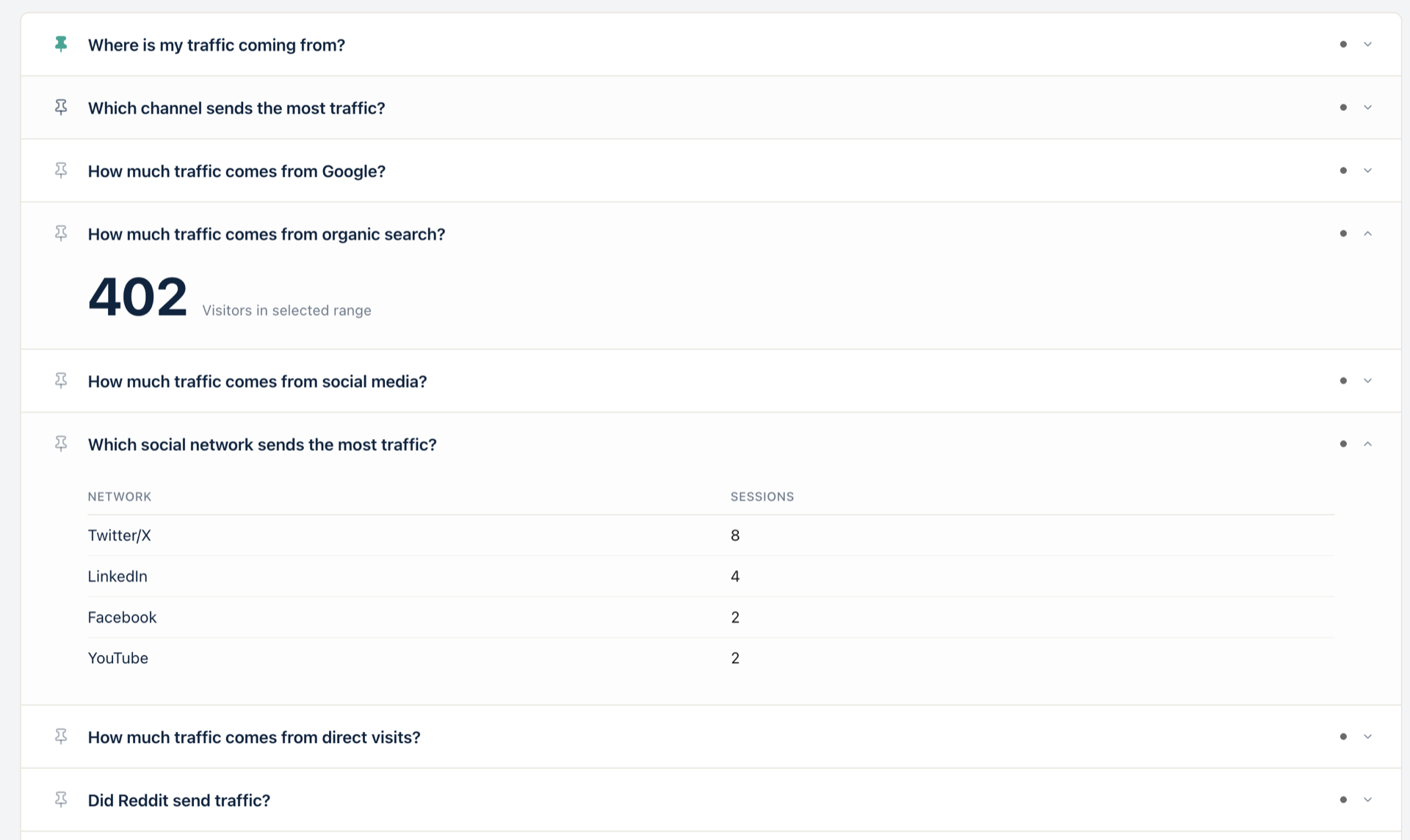
Search Console only shows Google’s view of your traffic — and only for 16 months. Statnive captures every organic visit at ingest, with no consent banner loss and no rolling window. Open Ask me! → 「Is organic traffic increasing?」 (q54) for the trend line. GSC is optional, not required.
If your organic traffic looks softer in 2026 than it did in 2024, the first instinct is to open Google Search Console, check impressions, and panic about a core update. That instinct is reasonable. It is also incomplete.
Search Console shows Google’s click count, not your traffic count. It caps history at 16 months. It samples, rounds, and hides queries below a privacy threshold. It does not see Bing, DuckDuckGo, Brave, Yandex, or Baidu. And in 2026, it does not separate “clicks Google sent you” from “clicks Google kept inside its AI Overview.” GSC is a useful signal — not a trend line you can make decisions on.
This post shows what to do instead: read your real organic trend from your own database, frame it against the 2026 number that matters (AI Overviews CTR loss), and treat GSC as a supplement.
What this post answers
- Why Search Console alone gives you a partial — and lagging — picture of organic traffic.
- The exact 2026 numbers behind AI Overviews and why they explain most “my traffic dropped” stories.
- How GA4 answers “is organic traffic increasing?” — the click path and where it gets fragile.
- How Ask me! → q54 answers it in one click, with the full referrer story attached.
- A decision rule for separating “AI Overviews ate my click” from “my content actually slipped.”
Why Search Console is not enough in 2026
Search Console is irreplaceable for query-level keyword data. For the question “how much organic traffic do I get and is it growing?”, three properties limit it:
- It only sees Google. Bing has 5-12% market share by region; DuckDuckGo and Brave grow on privacy-conscious audiences; Yandex and Baidu dominate specific markets. Search Console is silent on all of them. Statnive’s Organic Search channel groups visits from 27 search-engine hosts at ingest, no setup.
- It caps history at 16 months. Want to compare June 2026 against June 2024? Search Console will not show it. Your visitor table can, indefinitely, on your own database.
- It reports impressions and clicks, not sessions. A click in Search Console can hit your site as zero sessions if the user back-buttoned, or as one session if they stayed. The numbers do not reconcile cleanly, and the gap widens in 2026 because of AI Overviews.
That third point is where 2026 changes the math. AI Overviews sit between Google’s SERP and your site. The user can read the answer without ever clicking. Search Console records the impression and (often) the click; you see no visit because the click resolved inside Google’s AI panel. The “impressions up, clicks soft” pattern looks like a GSC bug — and is actually the new reality.
The 2026 numbers that explain most “traffic dropped” stories
Three measurements from Seer Interactive’s September 2025 update and Search Engine Land’s analysis lock the picture:
- AI Overviews prevalence jumped from 4.5% of queries (December 2024) to 13.14% (March 2025) to 47-64% of queries in 2026. Source: Seer Interactive, AIO Impact on Google CTR — September 2025 update.
- Informational queries lost 34-46% of CTR when an AI Overview appeared. Source: Search Engine Land, Google AI Overviews hurt click-through rates. Pew Research measured an 8% click rate on AIO-bearing SERPs versus a 15% baseline — a halving.
- Position 1-3 organic CTR can drop 20-64% when AIO appears above the result. Same Seer source. The top three rankings still matter; they just convert into clicks at a lower rate than they did in 2023.
If you run a content-heavy WordPress site, this is the story. Your rankings probably did not collapse; your content quality did not regress. The SERP changed shape, and a meaningful fraction of the people who used to click through now read the AI panel and leave.
Two decisions:
- Diagnosis. If your organic trend dropped 20-40% in 2026 but Bing and DuckDuckGo trends held, you are looking at AI Overviews on Google specifically — not a content failure.
- Strategy. Informational pages take the brunt. Transactional, comparison, and tool-style pages keep clicking through because the AI panel cannot transact for the user. Reallocate toward the work the AI cannot finish.
How GA4 answers “is organic traffic increasing?”
The click path in GA4 is four steps once you know it, and substantially more before you do:
- Reports → Acquisition → Traffic acquisition.
- Filter by Default channel group = “Organic Search.”
- Change the time range in the upper-right date picker.
- Toggle the “Compare” date selector to add a previous-period overlay (Last 28 days vs. Previous 28 days, for example).
The Sessions / Engaged sessions / Engagement rate columns now show the comparison. If you want a chart instead of a table, you flip to the line-chart view at the top of the report. If you want to see which queries drove the change, you have to leave GA4 entirely and open Search Console — because GA4 stopped showing query strings years ago (the “not provided” cookie reform).
That is four navigation steps in GA4, plus a second tool for the keyword layer, plus the two assumptions that GA4 will both keep the session in scope (consent banner) and keep classifying it as Organic (referrer recovery).
Privacy and ownership: the five-claim spine
Every Ask me! card runs against your own database. Five things hold:
- No AI. No LLM. The 117 questions are hand-written strings in
statnive/src/Advisor/Questions.php. The answer-rendering code is hand-written PHP. There is no model, prompt, embedding, or external API call. - No third-party API. Zero outbound calls from the Ask me! pathway. The
AdvisorControllerdoes not importwp_remote_*. - Nothing leaves your server. REST endpoint sits on the same WordPress install; no relay, no proxy, no CDN-cached endpoint, no telemetry beacon.
- You own the data. Statnive does not host, mirror, syndicate, or back up the data anywhere. The history is yours; the retention is yours.
- Cookieless. No fingerprinting. No third-party trackers. Daily-rotating SHA-256 salt hashes; IPs hashed, GeoIP’d, and discarded ephemerally.
This is why “Ask me! shows the organic trend” works without a cookie banner, without a Google account, and without consent rates eating half your sessions. The data is already there.
In Statnive: open Ask me! → click 「Is organic traffic increasing?」 → done
That is the one-click path. Open the Statnive admin tab, pick q54 from the Referrers category, and the AnswerModal renders the organic trend over your chosen date range. No filter chain, no second tool.
Two adjacent questions belong in the same loop:
- q43 — How much traffic comes from Google? Splits Organic Search by host so you can see Google specifically against Bing, DuckDuckGo, Brave, and Yandex side by side.
- q44 — How much traffic comes from organic search? The all-search-engines total, the single number to track week over week. This is the 402 highlighted in the hero screenshot above.
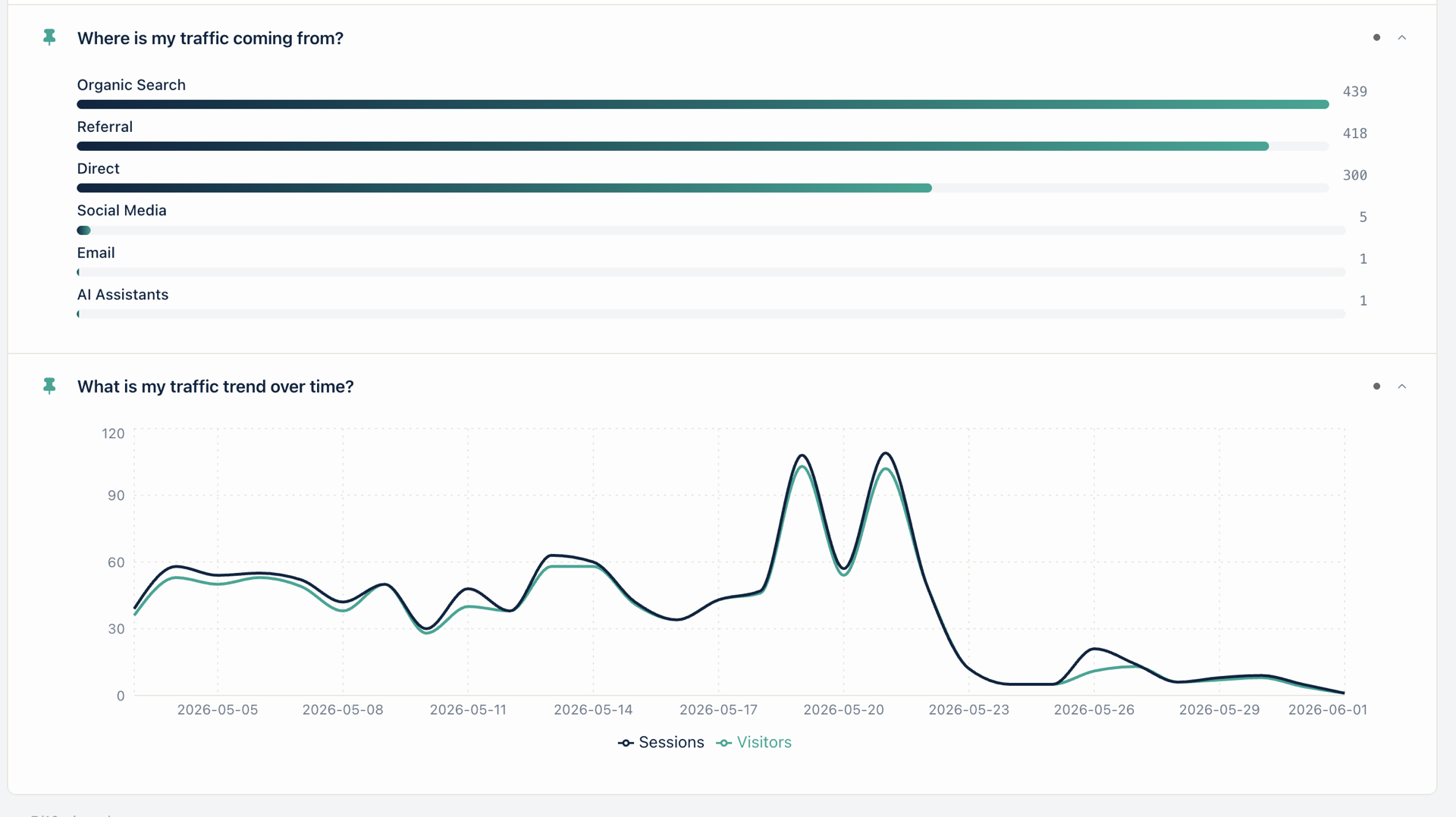
The supporting screenshot shows Organic Search at 439 sessions — the top bar in the channel breakdown. Pair with q54 for the trend, and you have the full picture: how much organic you get and which way it is moving.
Can I track organic traffic without GSC?
Yes. Three patterns, in order of completeness:
- Statnive Ask me! → q54 / q43 / q44. The trend, the search-engine breakdown, the total. Captured at ingest. No 16-month cap, no consent loss. This post’s recommended answer.
- GA4 Organic Search filter. Four-step path documented above. Works if you accept the consent-banner attrition and the GA4 query opacity.
- Server log analysis. The lowest-level option — parse referrer strings from your access logs with
goaccessor a custom script. Most accurate, most labour-intensive. Worth it for a forensic audit; not for weekly monitoring.
The Statnive route is the only one that works the moment the plugin tracks its first visit, with no second tool and no setup beyond installing the plugin.
What’s the difference between GA4 and Search Console organic data?
Search Console measures Google’s own click count at the SERP — impressions, clicks, average position, queries — and only for Google. GA4 (and Statnive) measure the visit on your site after the click happens — sessions, engagement, downstream events — for any search engine that sends a referrer.
The numbers will not match. Search Console clicks can exceed GA4 sessions when users back-button or close before the tracker fires. GA4 sessions can exceed Search Console clicks when GA4 over-counts on a flaky page or when search engines downgrade the referrer (you still see the visit, but the channel classification falls into Direct).
Use both. They answer different questions.
Why is my organic traffic not showing in Analytics?
Three common causes when GA4 looks empty but Search Console looks healthy:
- Consent-banner gating. GA4’s tag was blocked by the user’s choice on the banner. The visit happened; the tracker never fired.
- Referrer downgrade. The user arrived through an in-app browser (the Google app, the ChatGPT app, a Reddit embed) that stripped the referrer header. GA4 classifies the session as Direct because it cannot see where it came from.
- Tracker timing. The GA4 tag loaded after the referrer was no longer readable, or after the user back-buttoned. Common on sites with heavy frontend bundles.
Statnive sidesteps all three. The tracker fires server-side on the first request, reads the referrer once per visit, and stores the classification in your database. There is no banner to gate it and no client race to lose.
Decision rule: separate AI Overviews from content failure
The rule, in one sentence: if your Google organic trend dropped in 2026 but your Bing + DuckDuckGo trends held, you are looking at AI Overviews, not a content failure. Reallocate from informational to transactional content; do not rewrite the existing pages first.
How to apply it:
- Open Ask me! → q54 for the all-search trend.
- Open Ask me! → q43 for the per-host split (Google vs. Bing vs. DuckDuckGo vs. Brave).
- Compare the 2026 trajectory of Google against the others. A Google-specific drop with stable non-Google trends is the AIO pattern.
- Audit your top informational pages in the SERP manually — does AI Overviews appear above them? If yes, the click loss is structural; rewriting won’t recover it.
- Reallocate content investment toward pages the AI cannot finish for the user: pricing comparisons, configurators, calculators, account-creation flows, product-decision posts that need the user’s specific context.
The anchor benchmark to cite back to yourself: 34-46% CTR loss on informational queries when AIO appears (Search Engine Land, Sept 2025) and 20-64% position-1-3 CTR loss (Seer Interactive, Sept 2025). If your loss sits inside that band, the SERP is the culprit. Outside it (heavier loss across all search engines), the diagnosis is different — re-run the trend by landing page in q23 and look for a single set of URLs taking the hit.
Coming soon: the source-attribution layer
One adjacent question is not Live yet:
- q12 — Which source caused the biggest traffic change? Lands in a future Growth v2 release on the paid tier. The free-tier q54 + q43 + q44 combination already answers “is organic up or down” and “Google vs. the rest” today; q12 will automate the diff and surface the driver in a single card. Coming when Growth v2 ships.
What to do next
- Install Statnive on WordPress.org if you have not yet. The Organic Search channel groups itself automatically on the first visit.
- Open Ask me! → q54 “Is organic traffic increasing?” Set the date range to “Last 90 days” and read the slope.
- Pair with q43 “How much traffic comes from Google?” to split organic by host and isolate Google-specific changes.
- Cross-check against your Bing and DuckDuckGo trends. If those held while Google dropped, the diagnosis is AI Overviews, not content failure.
- Read the pillar on channel grouping for the full 5-channel framework that contains Organic Search.
- Read Find Best WooCommerce Traffic Sources Without GA4 for the quality-rule layer that turns the trend into a Scale/Fix/Maintain/Cut decision.
That is the workflow. No GA4 dependency, no Search Console limit, no AI Overviews surprise.
Install Statnive 1.1.0 free from WordPress.org →
Free forever · Self-hosted · No account · 2-minute setup · No AI · No third-party API · Your data never leaves your server.