Overview
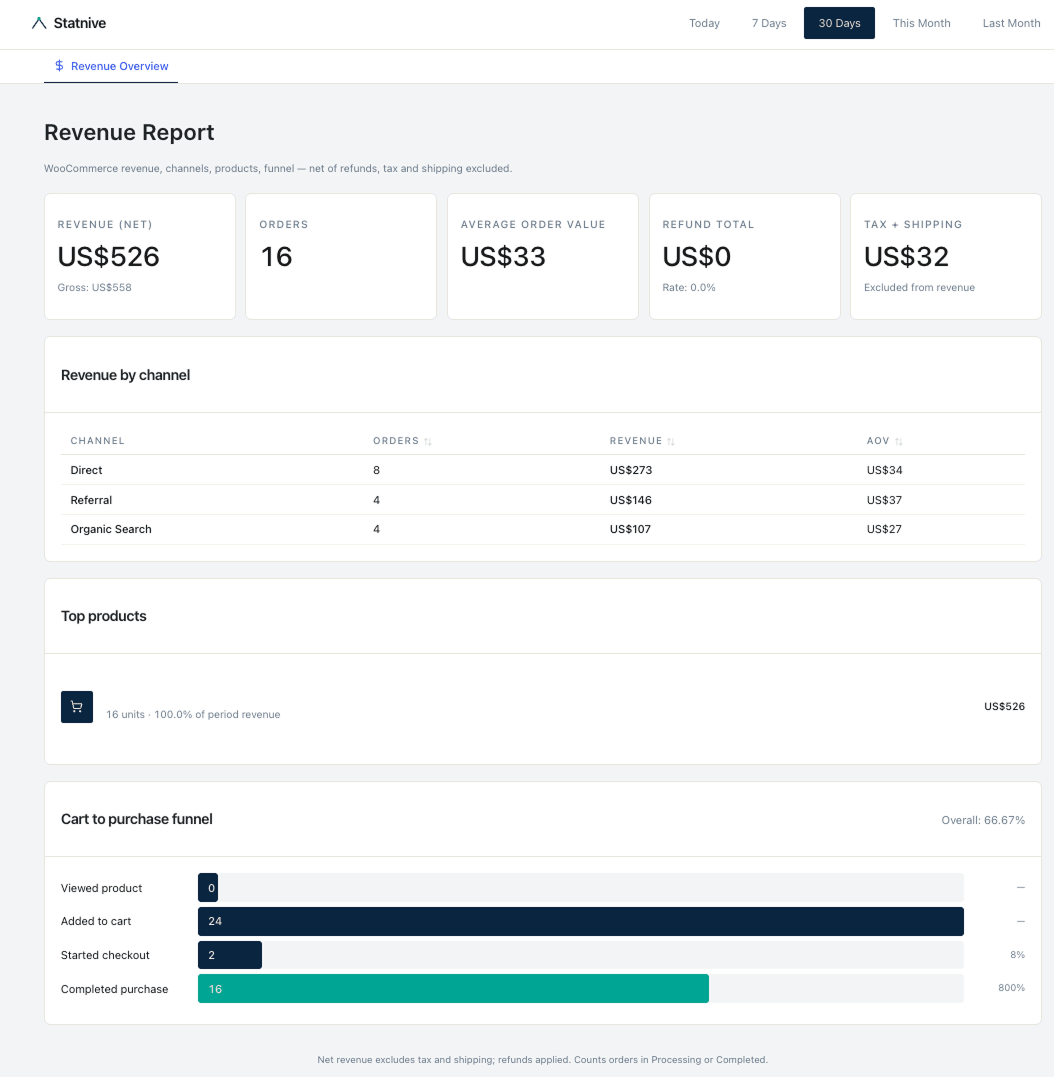
As of v1.0.0, the free Statnive WordPress plugin ships a dedicated Revenue Report that turns your WooCommerce order data into a CRO-focused dashboard inside /wp-admin. No setup, no paid tier, no third-party transfer — all data stays on your WordPress database.
The integration is built on WooCommerce 8.5+ Order Attribution, is HPOS + Block Checkout compatible, and is READ-ONLY against WooCommerce — Statnive uses only $order->get_*() getters and never writes to a WooCommerce table or post meta.
Requirements
- WordPress 6.2+ (tested up to 7.0)
- PHP 8.1+ (raised from 8.0 in v0.4.13)
- WooCommerce 8.5+ (Order Attribution required for channel attribution)
- Action Scheduler (bundled with WooCommerce since 5.4)
Five KPIs on the Revenue Report
| KPI | Source | Notes |
|---|---|---|
| Orders | COUNT(orders) in processing + completed | Refunded orders are tracked separately under Refund total |
| Revenue (net) | net_total − refund_total | Excludes tax and shipping; a Gross: $X helper appears underneath |
| Average Order Value | net_revenue / orders | Precise decimal display per WooCommerce store currency settings |
| Refund total + Rate | refund_total, refund_rate = refunds / gross | Shown as combined “Refund total · Rate: X%“ |
| Tax + Shipping | tax_total + shipping_total | Combined value, explicitly labelled “Excluded from revenue” |
Seven breakdowns
The Revenue Report renders seven dimensions on the page; all eleven endpoints (wc-status, backfill, summary, timeseries, by-channel, by-utm, by-landing, products, funnel, refunds, coupons) are also exposed via the REST API.
Revenue by Channel
Sortable table with Channel · Orders · Revenue · AOV across the 8 channels Statnive groups traffic into:
- Direct
- AI Assistants — 14 hosts: ChatGPT (
chatgpt.com,chat.openai.com), Claude (claude.ai), Gemini (gemini.google.com,bard.google.com,notebooklm.google.com), Copilot (copilot.microsoft.com), Perplexity (perplexity.ai), Meta AI (meta.ai), Le Chat / Mistral (chat.mistral.ai), DeepSeek (deepseek.com,chat.deepseek.com), You (you.com), iAsk (iask.ai), Jasper (jasper.ai), Writesonic (writesonic.com). AI detection runs before the search-engine classifier so AI referrals are never misattributed to Organic Search. - Organic Search
- Social Media
- Referral
- Paid Search (from UTM
medium=cpc,ppc,paidsearch,paid_search) - Paid Social (from UTM
medium=cpm,paid_social)
Top Products
Top 10 products by default (sortable by units or revenue, max 100). Variations are grouped under their parent product. Refunds are applied to the line item.
Cart-to-Purchase Funnel
Four stages, server-side from WooCommerce — no extra JS to install:
- Viewed product — event:
wc_product_view - Added to cart — event:
wc_add_to_cart - Started checkout — event:
wc_checkout_start - Completed purchase — event:
wc_purchase
Per-step conversion rate (current/previous) and overall conversion rate (purchases/widest mouth) are displayed alongside session counts.
v1.1.0 update. The “Overall %” denominator switched from first-step to widest-step, and per-step UI shows conversion %, not drop %. This matches the convention WooCommerce Analytics adopted in WC 9.x.
Revenue by UTM source / medium / campaign
Paginated table of utm_source, utm_medium, and utm_campaign values seen on attributed orders, with orders, revenue, and AOV per row.
Revenue by Landing page
Paginated table of entry landing pages with orders and revenue per page — answers “which entry surface actually sends buyers?”
Refunds
Refund-rate trend over the period plus a list of top refunded products, refunds applied at the line-item level.
Coupons
Paginated table of coupon redemptions: code, count, total discount amount, and net revenue after discount.
v1.1.0 date bucketing
Orders are bucketed by
COALESCE(date_paid_gmt, date_created_gmt)so subscription renewals and delayed-payment orders (BACS, cheque, cash-on-delivery, late-completing webhooks) land on the day payment cleared, not the day the order was placed. Previously, v1.0.0 useddate_created_gmtonly, which mis-placed renewal payments in the past.
Zero-touch backfill
The first time you open the Revenue Report after activating v1.0.0 on a WooCommerce site, Statnive enqueues background jobs through Action Scheduler to import historical orders. The status appears at the top of the Revenue Report while it runs.
- Chunk size: 500 orders per Action Scheduler hook (
statnive/wc/backfill/chunk) - Counted statuses:
processingandcompleted. Refunded line items reduce the line-item revenue on their parent order rather than being counted as a separate status. - Visibility: WooCommerce → Status → Scheduled Actions, filter by
statnive/wc/backfill/chunk
CLI alternative
For sites where you prefer to trigger or monitor the backfill from the command line:
wp statnive woocommerce-backfillThe command is idempotent — re-running while a backfill is in progress returns a 409.
Database tables
v1.0.0 adds five new tables via dbDelta. Your existing Statnive tables and data are preserved on upgrade from 0.4.x.
| Table | Purpose |
|---|---|
wp_statnive_orders | Order metadata, attribution snapshot, channel |
wp_statnive_order_attribution | Channel, UTM parameters, referrer host, funnel steps |
wp_statnive_order_items | Line items, products, SKU, refund tracking |
wp_statnive_order_refunds | Refund events with amount and reason |
wp_statnive_order_coupons | Coupon usage per order, discount amounts |
The table prefix follows your WordPress $wpdb->prefix.
Privacy + safety posture
- READ-ONLY against WooCommerce. Only
$order->get_*()getters; Statnive never writes to a WooCommerce table or post meta. Verified empirically withCHECKSUM TABLEbefore/after on a 1,933-order site. - Cookieless. No browser storage of any kind for visitor identification.
- Daily-rotating salts (CSPRNG-generated, 48-hour overlap window) — the same visitor produces a different hash each day, making cross-day re-identification impossible.
- No raw IP storage. IP is hashed, used for GeoIP lookup, then immediately discarded. IPv4: last octet zeroed. IPv6: last 80 bits zeroed.
- GPC + DNT are respected server-side.
- WordPress Privacy API exporter and eraser are registered on activation.
- Opt-in uninstall (default OFF). Re-installing preserves analytics and revenue history.
Top-level admin pages
After activating v1.1.0, the Statnive admin navigation has these scoped pages:
- Overview (
/wp-admin/admin.php?page=statnive) — Visitors, Sessions, Pageviews, Avg Duration, plus Top Sources and Top Pages - Revenue Report (
/wp-admin/admin.php?page=statnive-revenue) — the five KPIs + seven breakdowns described above - Ask me! (
/wp-admin/admin.php?page=statnive-ask) — 116 owner-phrased questions across 10 categories, 63 answer today (v1.1.0+) - Settings (
/wp-admin/admin.php?page=statnive-settings) — privacy, retention, exclusions, GeoIP
No WooCommerce-specific configuration is required. The integration is always-on once WooCommerce is installed.
Upgrading from 0.4.x
Drop-in upgrade. Five new tables are added via dbDelta; the existing 21 tables and their data are untouched. On a WooCommerce site, the Revenue Report fills in within a few minutes of activation via the zero-touch backfill. No code change required.
See the v1.0.0 changelog for the full release notes.